> ## Documentation Index
> Fetch the complete documentation index at: https://code.claude.com/docs/llms.txt
> Use this file to discover all available pages before exploring further.
# Share session output as artifacts
> Artifacts turn Claude Code's work into live, interactive pages at a private URL you can share inside your organization.
{/* plan-availability: feature=artifacts plans=team,enterprise providers=anthropic */}
Artifacts are in beta. They require a Team or Enterprise plan and a session signed in with [`/login`](/en/setup#authenticate). See [Availability](#availability) for the full set of requirements.
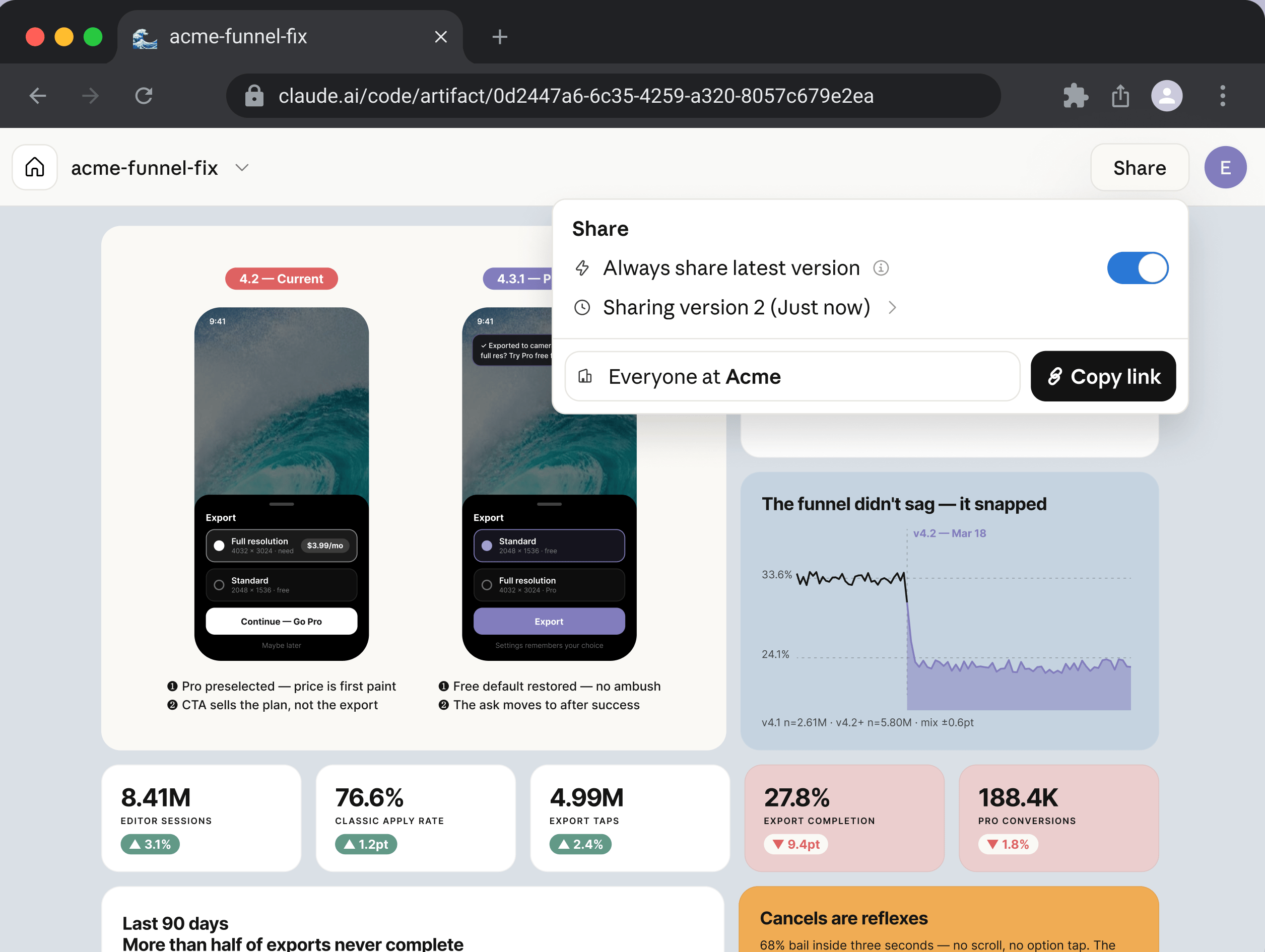
An artifact is a live, interactive web page that Claude Code publishes from your session to a private URL on claude.ai. You open it in a browser, and it updates in place as the session continues. Share it from the page header when you want a teammate to see it too. For example, use an artifact to walk a reviewer through a pull request with annotated diffs, build a dashboard from session data, or keep an investigation timeline that fills in as Claude works.
 ## When to use an artifact
Use an artifact when terminal text is the wrong medium for what Claude produced: output that is easier to look at and interact with than to read line by line. Claude builds the page from anything your session can reach, including your codebase and data it pulls through your [connected tools](/en/mcp), so the page can show things that would take paragraphs to describe. For example, ask Claude to:
* Walk a reviewer through a pull request with annotated diffs
* Render a dashboard from data the session already pulled
* Lay out several design or implementation options side by side
* Keep an investigation timeline that fills in while a long task runs
* Send a teammate a link instead of pasting output into Slack
See [What you can build](#what-you-can-build) for prompts that match each of these.
### What an artifact is not
An artifact is a capture of work, not an application. It is one self-contained page with no backend, so it cannot store form input, call an API at view time, or serve multiple routes. For a hosted internal tool with a backend, deploy it on your own infrastructure instead. See [Page constraints](#page-constraints) for the full set of limits.
## Create an artifact
Claude may publish an artifact on its own when the output suits a page, or you can ask for one directly. To ask, name the feature or describe the visual output you want in plain language. A good candidate is anything easier to see than to read as text, such as an annotated diff, a chart, or a set of options to compare. The prompts below are two examples; see [What you can build](#what-you-can-build) for more patterns.
```text wrap theme={null}
Make an artifact that walks through this PR with the diff annotated inline.
```
```text wrap theme={null}
Build a dashboard artifact of last week's deploy failures by service and keep it updated as you investigate.
```
Claude writes the page to an HTML or Markdown file in your project, then publishes it. Before publishing a new artifact, Claude Code asks for permission; it might say something like `Claude wants to publish "Deploy failures by service" (deploy-failures.html) to a private page on claude.ai`. Republishing an artifact you have already approved does not prompt again.
Select **Yes** to publish. Claude prints the URL, and your browser opens to the new page. Press `Ctrl+]` at any time to reopen the most recent artifact from the terminal.
Claude picks the artifact's title and an emoji for its browser-tab icon. Both appear in your [gallery of artifacts](#share-an-artifact) on claude.ai and in shared links, so ask Claude to use a specific title or icon if you want one.
To stop the browser from opening automatically when a new artifact is published, set `CLAUDE_CODE_ARTIFACT_AUTO_OPEN=0` in your environment.
If Claude responds that it cannot publish, or writes a local HTML file without a link, the tool is not enabled for your session. Check the [Availability](#availability) requirements.
## Update an artifact
Ask Claude to revise the page, or let a long-running task republish as it makes progress. Claude edits the underlying file and publishes again to the same URL.
```text wrap theme={null}
Add a per-region breakdown below the summary chart and republish.
```
Anyone with the page open sees the update in place. Each publish becomes a version, and from the **Share** control in the page header you can choose which version viewers see.
To update an artifact from a different session, give Claude the artifact's URL and ask it to revise. Without the URL, a new session always creates a new artifact rather than updating an existing one.
```text wrap theme={null}
Update https://claude.ai/code/artifact/5fbea6f3-... with today's numbers.
```
## Share an artifact
A new artifact is visible only to you. Open it in your browser and use the **Share** control in the page header to grant access to specific people in your organization, or to everyone in it. The header names you as the artifact's author, so anyone you share it with can see who published the page. It also links to your gallery at [claude.ai/code/artifacts](https://claude.ai/code/artifacts), which lists every artifact you have created.
Sharing stops at your organization. Viewers must sign in to claude.ai as a member of the same organization that published the artifact, and there is no option to make an artifact viewable outside it. To send the underlying content to someone outside your organization, ask Claude for the HTML file and share that file directly.
Artifacts are viewable, not co-edited. People you share with see each version you publish but cannot change the page; you remain the only writer.
## What you can build
An artifact is a single HTML page, so anything you can express in HTML, CSS, and inline JavaScript is in scope. The patterns below come up most often.
### Walk through a change
Ask for a page that renders a diff or a design change with annotations beside the relevant lines, so reviewers can read your reasoning next to the code instead of reconstructing it from a description.
```text wrap theme={null}
Make an artifact that walks through this PR. Render the diff with margin annotations and color-code findings by severity.
```
### Compare alternatives
Ask for several variants on one page so you can evaluate them against each other. This works for layouts, copy, API shapes, or implementation plans.
```text wrap theme={null}
Make an artifact with four distinctly different layouts for the settings panel. Vary density and grouping, and lay them out as a grid with a one-line tradeoff under each.
```
### Tune with interactive controls
Ask for sliders, toggles, or input fields bound to whatever you are adjusting, so you can explore values directly instead of describing them.
```text wrap theme={null}
Build an artifact with sliders for the easing curve, duration, and delay so I can try values on this transition. Show the animation live as I move them.
```
### Bring the result back to your session
An artifact can act as a lightweight editor for a decision you then hand back to Claude. Ask for an export control that produces text you can paste into the terminal, so the result of interacting with the page flows back into the session instead of staying on the page.
```text wrap theme={null}
Make a triage board artifact with each open issue as a draggable card across Now, Next, Later, and Cut columns. Add a "Copy as prompt" button that gives me the final ordering to paste back here.
```
### Track work in progress
Ask Claude to keep an artifact current while a long task runs, so anyone with the link can follow along without reading the terminal.
```text wrap theme={null}
Turn this migration plan into a checklist artifact. Check items off as you complete them and add a note for anything you skip.
```
## Improve the visual design
Claude applies a built-in design skill when it builds an artifact, so pages get a deliberate palette, typography, and layout without extra prompting. That skill also looks for an existing design system in your project before choosing its own. To keep artifacts consistent with your product's branding, record your design tokens where Claude can find them, such as the project's [CLAUDE.md](/en/memory) or a theme file in your repository:
```markdown theme={null}
## Design system
- Colors: primary #1a4d8f, accent #f59e0b, surface #f8fafc
- Typography: Inter for body, JetBrains Mono for code
- Spacing: 8px scale, 6px border radius
```
Claude treats your design system as higher precedence than its own choices, and your prompt as higher precedence than both. The heading and format above are an example; any clear list of colors, fonts, and spacing works.
## Page constraints
Each artifact is one self-contained page. Claude Code wraps the file you publish in an HTML document shell and serves it under a strict Content Security Policy (CSP), which shapes what the page can do.
| Constraint | Effect |
| :------------------- | :-------------------------------------------------------------------------------------------------------------------------------------------------------------------------------------------------------------------------------------------------- |
| No external requests | The CSP blocks scripts, stylesheets, fonts, and images loaded from any other host, along with `fetch`, XHR, and WebSocket calls. Claude inlines CSS and JavaScript and embeds images as data URIs so the page renders without any external request. |
| No backend | An artifact is a static page. It cannot store data submitted through a form, authenticate viewers itself, or call an API at view time. |
| Single page | Relative links do not resolve, because nothing is deployed alongside the page. For multi-section content, Claude uses in-page anchors rather than separate files. |
| Source file types | The published file must be `.html`, `.htm`, or `.md`. Markdown files render as styled HTML. |
| Rendered size | The rendered page must be 16 MiB or smaller. Large embedded images are the usual cause when a publish fails for size. |
Generating an artifact uses output tokens like any other response, and a styled page is more token-intensive than the same content as terminal text. Inline CSS, JavaScript for interactive controls, and especially images embedded as data URIs are the main contributors. To reduce an artifact's token cost:
* Prefer SVG, or HTML and CSS, for diagrams over embedded raster images
* Omit interactivity you do not need
* Have the page summarize large datasets rather than inline them in full
## Availability
Artifacts require every condition below. When one is not met, Claude writes a local HTML file or says it cannot publish instead.
| Requirement | Available when |
| :------------------ | :------------------------------------------------------------------------------------------------------------------------------------------------------------------------------------------------------------------------------------------------ |
| Plan | Team or Enterprise. On Team plans, artifacts are on by default. On Enterprise plans, an Owner [enables them](#manage-artifacts-for-your-organization) in claude.ai admin settings. |
| Authentication | Signed in to claude.ai with `/login`. Sessions using an API key, [gateway token](/en/llm-gateway), or cloud-provider credential cannot publish. |
| Model provider | Anthropic API. Not available on [Amazon Bedrock](/en/amazon-bedrock), [Google Cloud Vertex AI](/en/google-vertex-ai), or [Microsoft Foundry](/en/microsoft-foundry). |
| Organization policy | Customer-managed encryption keys (CMEK), HIPAA, and [Zero Data Retention](/en/zero-data-retention) are not enabled for the organization. |
| Surface | Claude Code CLI, or the Claude desktop app version 1.13576.0 or later. Off by default in [Agent SDK](/en/agent-sdk/overview), GitHub Action, and MCP-server contexts, and when [`CLAUDE_CODE_DISABLE_NONESSENTIAL_TRAFFIC`](/en/env-vars) is set. |
## Disable artifacts
To turn artifacts off for your own sessions regardless of your organization's setting, use any of:
| Method | Setting |
| :----------------------------------- | :----------------------------------- |
| [Settings file](/en/settings) | `"disableArtifact": true` |
| [Environment variable](/en/env-vars) | `CLAUDE_CODE_DISABLE_ARTIFACT=1` |
| [Permission rule](/en/permissions) | Add `Artifact` to `permissions.deny` |
## Manage artifacts for your organization
Owners on Team and Enterprise plans control artifacts from [claude.ai admin settings](https://claude.ai/admin-settings/claude-code). Artifact content is stored on Anthropic-operated infrastructure and is visible only to authenticated members of the publishing organization.
### Enable or disable artifacts
To enable or disable artifacts for the whole organization, go to **Settings > Claude Code > Capabilities** and use the **Artifacts** toggle. On Enterprise plans with role-based access control, you can additionally scope artifacts to specific roles: go to **Settings > Roles**, edit a role, and set the **Artifacts** permission under the **Claude Code** group.
### Set a retention policy
To set how long artifacts are kept before automatic deletion, go to **Settings > Data & privacy controls**. You can set separate retention periods for artifacts that are still private to their author and artifacts that have been shared.
### Review the audit log
Publishing, sharing, and deleting an artifact each appear in your organization's audit log under the `claude_artifact_*` event types, the same family used for artifacts created in claude.ai conversations.
### Allowlist the viewer domain
The viewer on claude.ai loads each artifact from a sandboxed `*.claudeusercontent.com` origin. If your organization restricts outbound network access, add that domain to your allowlist alongside `claude.ai`. See [Network access requirements](/en/network-config#network-access-requirements) for the full list.
### List and delete artifacts with the Compliance API
The [Compliance API](https://docs.claude.com/en/api/compliance) provides endpoints to list an organization's artifacts, retrieve a specific version's content, and delete an artifact:
| Method | Endpoint |
| :------- | :------------------------------------------------------------------ |
| `GET` | `/v1/compliance/code/artifacts` |
| `GET` | `/v1/compliance/code/artifacts/{artifact_id}/versions/{version_id}` |
| `DELETE` | `/v1/compliance/code/artifacts/{artifact_id}` |
For the request and response schemas, see the [Compliance API reference](https://docs.claude.com/en/api/compliance/code/artifacts).
## Related resources
* Browse [prompting patterns and workflows](/en/prompt-library) that pair with artifacts
* Turn an artifact prompt you reuse into a [skill](/en/skills) so you can invoke it as a command
* [Connect MCP servers](/en/mcp) so Claude can pull live data into an artifact
## When to use an artifact
Use an artifact when terminal text is the wrong medium for what Claude produced: output that is easier to look at and interact with than to read line by line. Claude builds the page from anything your session can reach, including your codebase and data it pulls through your [connected tools](/en/mcp), so the page can show things that would take paragraphs to describe. For example, ask Claude to:
* Walk a reviewer through a pull request with annotated diffs
* Render a dashboard from data the session already pulled
* Lay out several design or implementation options side by side
* Keep an investigation timeline that fills in while a long task runs
* Send a teammate a link instead of pasting output into Slack
See [What you can build](#what-you-can-build) for prompts that match each of these.
### What an artifact is not
An artifact is a capture of work, not an application. It is one self-contained page with no backend, so it cannot store form input, call an API at view time, or serve multiple routes. For a hosted internal tool with a backend, deploy it on your own infrastructure instead. See [Page constraints](#page-constraints) for the full set of limits.
## Create an artifact
Claude may publish an artifact on its own when the output suits a page, or you can ask for one directly. To ask, name the feature or describe the visual output you want in plain language. A good candidate is anything easier to see than to read as text, such as an annotated diff, a chart, or a set of options to compare. The prompts below are two examples; see [What you can build](#what-you-can-build) for more patterns.
```text wrap theme={null}
Make an artifact that walks through this PR with the diff annotated inline.
```
```text wrap theme={null}
Build a dashboard artifact of last week's deploy failures by service and keep it updated as you investigate.
```
Claude writes the page to an HTML or Markdown file in your project, then publishes it. Before publishing a new artifact, Claude Code asks for permission; it might say something like `Claude wants to publish "Deploy failures by service" (deploy-failures.html) to a private page on claude.ai`. Republishing an artifact you have already approved does not prompt again.
Select **Yes** to publish. Claude prints the URL, and your browser opens to the new page. Press `Ctrl+]` at any time to reopen the most recent artifact from the terminal.
Claude picks the artifact's title and an emoji for its browser-tab icon. Both appear in your [gallery of artifacts](#share-an-artifact) on claude.ai and in shared links, so ask Claude to use a specific title or icon if you want one.
To stop the browser from opening automatically when a new artifact is published, set `CLAUDE_CODE_ARTIFACT_AUTO_OPEN=0` in your environment.
If Claude responds that it cannot publish, or writes a local HTML file without a link, the tool is not enabled for your session. Check the [Availability](#availability) requirements.
## Update an artifact
Ask Claude to revise the page, or let a long-running task republish as it makes progress. Claude edits the underlying file and publishes again to the same URL.
```text wrap theme={null}
Add a per-region breakdown below the summary chart and republish.
```
Anyone with the page open sees the update in place. Each publish becomes a version, and from the **Share** control in the page header you can choose which version viewers see.
To update an artifact from a different session, give Claude the artifact's URL and ask it to revise. Without the URL, a new session always creates a new artifact rather than updating an existing one.
```text wrap theme={null}
Update https://claude.ai/code/artifact/5fbea6f3-... with today's numbers.
```
## Share an artifact
A new artifact is visible only to you. Open it in your browser and use the **Share** control in the page header to grant access to specific people in your organization, or to everyone in it. The header names you as the artifact's author, so anyone you share it with can see who published the page. It also links to your gallery at [claude.ai/code/artifacts](https://claude.ai/code/artifacts), which lists every artifact you have created.
Sharing stops at your organization. Viewers must sign in to claude.ai as a member of the same organization that published the artifact, and there is no option to make an artifact viewable outside it. To send the underlying content to someone outside your organization, ask Claude for the HTML file and share that file directly.
Artifacts are viewable, not co-edited. People you share with see each version you publish but cannot change the page; you remain the only writer.
## What you can build
An artifact is a single HTML page, so anything you can express in HTML, CSS, and inline JavaScript is in scope. The patterns below come up most often.
### Walk through a change
Ask for a page that renders a diff or a design change with annotations beside the relevant lines, so reviewers can read your reasoning next to the code instead of reconstructing it from a description.
```text wrap theme={null}
Make an artifact that walks through this PR. Render the diff with margin annotations and color-code findings by severity.
```
### Compare alternatives
Ask for several variants on one page so you can evaluate them against each other. This works for layouts, copy, API shapes, or implementation plans.
```text wrap theme={null}
Make an artifact with four distinctly different layouts for the settings panel. Vary density and grouping, and lay them out as a grid with a one-line tradeoff under each.
```
### Tune with interactive controls
Ask for sliders, toggles, or input fields bound to whatever you are adjusting, so you can explore values directly instead of describing them.
```text wrap theme={null}
Build an artifact with sliders for the easing curve, duration, and delay so I can try values on this transition. Show the animation live as I move them.
```
### Bring the result back to your session
An artifact can act as a lightweight editor for a decision you then hand back to Claude. Ask for an export control that produces text you can paste into the terminal, so the result of interacting with the page flows back into the session instead of staying on the page.
```text wrap theme={null}
Make a triage board artifact with each open issue as a draggable card across Now, Next, Later, and Cut columns. Add a "Copy as prompt" button that gives me the final ordering to paste back here.
```
### Track work in progress
Ask Claude to keep an artifact current while a long task runs, so anyone with the link can follow along without reading the terminal.
```text wrap theme={null}
Turn this migration plan into a checklist artifact. Check items off as you complete them and add a note for anything you skip.
```
## Improve the visual design
Claude applies a built-in design skill when it builds an artifact, so pages get a deliberate palette, typography, and layout without extra prompting. That skill also looks for an existing design system in your project before choosing its own. To keep artifacts consistent with your product's branding, record your design tokens where Claude can find them, such as the project's [CLAUDE.md](/en/memory) or a theme file in your repository:
```markdown theme={null}
## Design system
- Colors: primary #1a4d8f, accent #f59e0b, surface #f8fafc
- Typography: Inter for body, JetBrains Mono for code
- Spacing: 8px scale, 6px border radius
```
Claude treats your design system as higher precedence than its own choices, and your prompt as higher precedence than both. The heading and format above are an example; any clear list of colors, fonts, and spacing works.
## Page constraints
Each artifact is one self-contained page. Claude Code wraps the file you publish in an HTML document shell and serves it under a strict Content Security Policy (CSP), which shapes what the page can do.
| Constraint | Effect |
| :------------------- | :-------------------------------------------------------------------------------------------------------------------------------------------------------------------------------------------------------------------------------------------------- |
| No external requests | The CSP blocks scripts, stylesheets, fonts, and images loaded from any other host, along with `fetch`, XHR, and WebSocket calls. Claude inlines CSS and JavaScript and embeds images as data URIs so the page renders without any external request. |
| No backend | An artifact is a static page. It cannot store data submitted through a form, authenticate viewers itself, or call an API at view time. |
| Single page | Relative links do not resolve, because nothing is deployed alongside the page. For multi-section content, Claude uses in-page anchors rather than separate files. |
| Source file types | The published file must be `.html`, `.htm`, or `.md`. Markdown files render as styled HTML. |
| Rendered size | The rendered page must be 16 MiB or smaller. Large embedded images are the usual cause when a publish fails for size. |
Generating an artifact uses output tokens like any other response, and a styled page is more token-intensive than the same content as terminal text. Inline CSS, JavaScript for interactive controls, and especially images embedded as data URIs are the main contributors. To reduce an artifact's token cost:
* Prefer SVG, or HTML and CSS, for diagrams over embedded raster images
* Omit interactivity you do not need
* Have the page summarize large datasets rather than inline them in full
## Availability
Artifacts require every condition below. When one is not met, Claude writes a local HTML file or says it cannot publish instead.
| Requirement | Available when |
| :------------------ | :------------------------------------------------------------------------------------------------------------------------------------------------------------------------------------------------------------------------------------------------ |
| Plan | Team or Enterprise. On Team plans, artifacts are on by default. On Enterprise plans, an Owner [enables them](#manage-artifacts-for-your-organization) in claude.ai admin settings. |
| Authentication | Signed in to claude.ai with `/login`. Sessions using an API key, [gateway token](/en/llm-gateway), or cloud-provider credential cannot publish. |
| Model provider | Anthropic API. Not available on [Amazon Bedrock](/en/amazon-bedrock), [Google Cloud Vertex AI](/en/google-vertex-ai), or [Microsoft Foundry](/en/microsoft-foundry). |
| Organization policy | Customer-managed encryption keys (CMEK), HIPAA, and [Zero Data Retention](/en/zero-data-retention) are not enabled for the organization. |
| Surface | Claude Code CLI, or the Claude desktop app version 1.13576.0 or later. Off by default in [Agent SDK](/en/agent-sdk/overview), GitHub Action, and MCP-server contexts, and when [`CLAUDE_CODE_DISABLE_NONESSENTIAL_TRAFFIC`](/en/env-vars) is set. |
## Disable artifacts
To turn artifacts off for your own sessions regardless of your organization's setting, use any of:
| Method | Setting |
| :----------------------------------- | :----------------------------------- |
| [Settings file](/en/settings) | `"disableArtifact": true` |
| [Environment variable](/en/env-vars) | `CLAUDE_CODE_DISABLE_ARTIFACT=1` |
| [Permission rule](/en/permissions) | Add `Artifact` to `permissions.deny` |
## Manage artifacts for your organization
Owners on Team and Enterprise plans control artifacts from [claude.ai admin settings](https://claude.ai/admin-settings/claude-code). Artifact content is stored on Anthropic-operated infrastructure and is visible only to authenticated members of the publishing organization.
### Enable or disable artifacts
To enable or disable artifacts for the whole organization, go to **Settings > Claude Code > Capabilities** and use the **Artifacts** toggle. On Enterprise plans with role-based access control, you can additionally scope artifacts to specific roles: go to **Settings > Roles**, edit a role, and set the **Artifacts** permission under the **Claude Code** group.
### Set a retention policy
To set how long artifacts are kept before automatic deletion, go to **Settings > Data & privacy controls**. You can set separate retention periods for artifacts that are still private to their author and artifacts that have been shared.
### Review the audit log
Publishing, sharing, and deleting an artifact each appear in your organization's audit log under the `claude_artifact_*` event types, the same family used for artifacts created in claude.ai conversations.
### Allowlist the viewer domain
The viewer on claude.ai loads each artifact from a sandboxed `*.claudeusercontent.com` origin. If your organization restricts outbound network access, add that domain to your allowlist alongside `claude.ai`. See [Network access requirements](/en/network-config#network-access-requirements) for the full list.
### List and delete artifacts with the Compliance API
The [Compliance API](https://docs.claude.com/en/api/compliance) provides endpoints to list an organization's artifacts, retrieve a specific version's content, and delete an artifact:
| Method | Endpoint |
| :------- | :------------------------------------------------------------------ |
| `GET` | `/v1/compliance/code/artifacts` |
| `GET` | `/v1/compliance/code/artifacts/{artifact_id}/versions/{version_id}` |
| `DELETE` | `/v1/compliance/code/artifacts/{artifact_id}` |
For the request and response schemas, see the [Compliance API reference](https://docs.claude.com/en/api/compliance/code/artifacts).
## Related resources
* Browse [prompting patterns and workflows](/en/prompt-library) that pair with artifacts
* Turn an artifact prompt you reuse into a [skill](/en/skills) so you can invoke it as a command
* [Connect MCP servers](/en/mcp) so Claude can pull live data into an artifact