> ## Documentation Index
> Fetch the complete documentation index at: https://docs.bytebase.com/llms.txt
> Use this file to discover all available pages before exploring further.
# Database GitOps with GitLab CI
This is part of our database GitOps series with Bytebase:
* [Database GitOps with GitHub Actions](/tutorials/gitops-github-workflow)
* [Database GitOps with Azure DevOps Pipeline](/tutorials/gitops-azure-devops-workflow)
* Database GitOps with GitLab CI (this one)
* [Database GitOps with Bitbucket Pipelines](/tutorials/gitops-bitbucket-workflow)
***
This tutorial shows you how to build an database GitOps workflow using GitLab CI and Bytebase API. You'll learn to create a streamlined database release workflow where you can:
* Submit schema migrations through GitLab
* Automatically run SQL reviews on merge requests
* Auto-create and deploy Bytebase releases when merging to `main`
While we use GitLab CI in this guide, you can apply these concepts to other CI platforms like GitHub Actions, Bitbucket Pipelines, or Azure DevOps using the Bytebase API.
While we use PostgreSQL with GitLab CI in this guide, you can apply these concepts to other SQL or NoSQL databases with any CI platforms like GitHub Actions, Bitbucket Pipelines, or Azure DevOps using the Bytebase API.
## Repository
[https://gitlab.com/bytebase-sample/gitops-example](https://gitlab.com/bytebase-sample/gitops-example)
## Prerequisites
* A Bytebase instance (Bytebase Cloud or self-hosted)
* For self-hosted version, you need [Docker](https://www.docker.com/) to run Bytebase
## Automatic Rollout across environments
### Step 1 - Set up Bytebase
Use [Bytebase Cloud](https://cloud.bytebase.com/) for instant setup without infrastructure management. CI/CD services can connect immediately.
**Best for:** Quick testing, evaluation, and small teams
Run Bytebase in Docker within your infrastructure:
```bash theme={null}
docker run --rm --init \
--name bytebase \
--publish 8080:8080 --pull always \
--volume ~/.bytebase/data:/var/opt/bytebase \
bytebase/bytebase:latest
```
**Network Access Options:**
* **For testing:** Use tools such as [ngrok](https://ngrok.com/) or [VS Code port forwarding](https://code.visualstudio.com/docs/editor/port-forwarding) to temporarily expose your local Bytebase to cloud CI/CD services. After exposing, configure the **External URL** in Bytebase **Settings > General**.
* **For production:** Use self-hosted CI/CD runners within your private network. Never expose production Bytebase to the internet.
**Best for:** Organizations with security requirements or existing infrastructure
See [Network Architecture guide](/get-started/self-host/network-architecture#2-self-hosted-bytebase-production).
### Step 2 - Create Service Account
1. Log in as `Workspace Admin`, and go to **IAM & Admin** > **Users & Groups**. Click **+ Add User**, fill in with `api-sample`, and assign the `Workspace Member` and `GitOps Service Agent` roles, which are sufficient for this tutorial, then click **Confirm**.
2. Find the newly created service account and **Copy Service Key**. We will use this token to authenticate the API calls.
 ### Step 3 - Configure SQL Review in Bytebase
Since you will need to run SQL review on your PRs, you need to configure the SQL review in Bytebase.
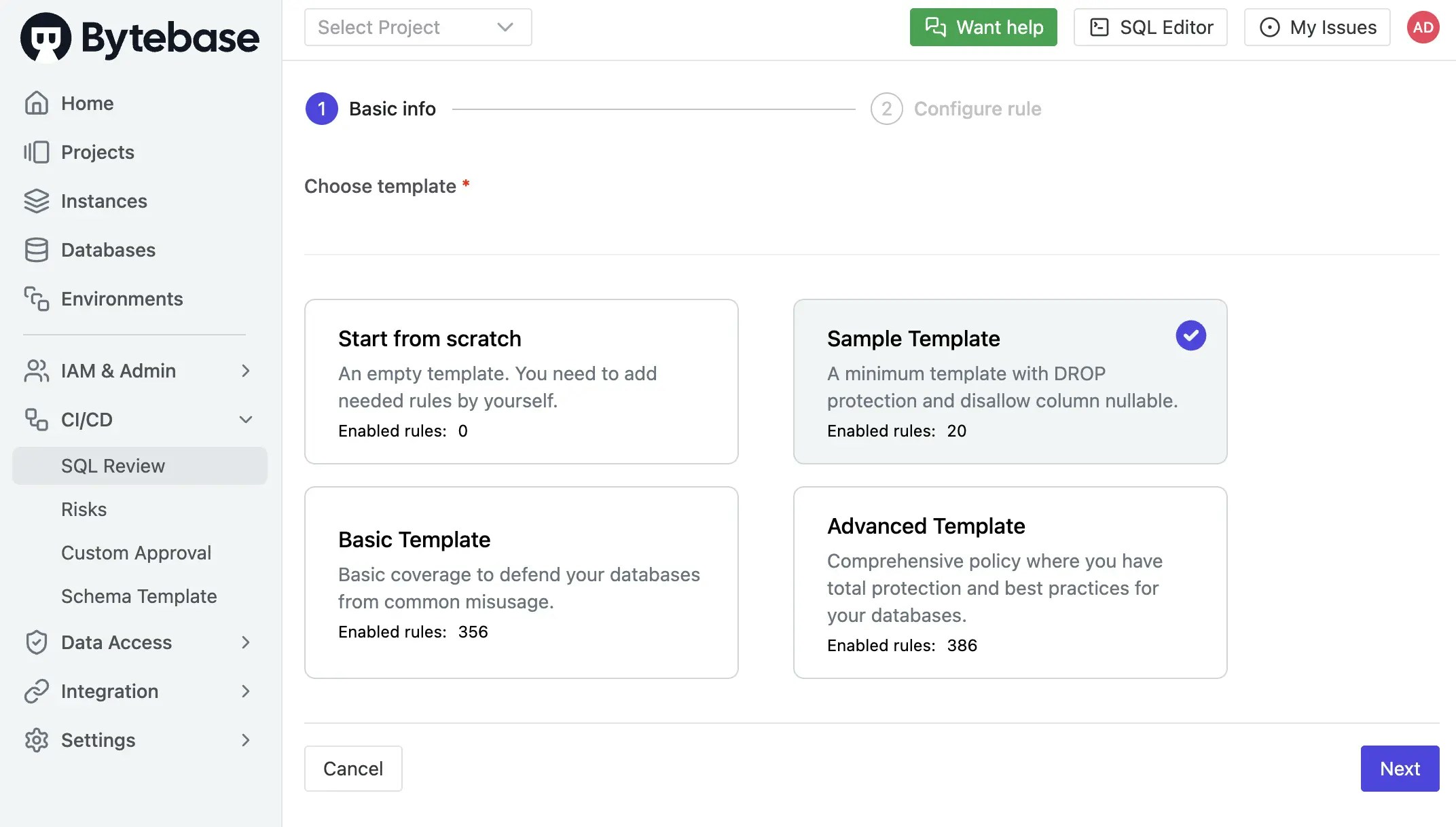
1. Go to **CI/CD** > **SQL Review**, click **Create SQL Review**.
2. Select the `Sample Template` and click **Next**.
### Step 3 - Configure SQL Review in Bytebase
Since you will need to run SQL review on your PRs, you need to configure the SQL review in Bytebase.
1. Go to **CI/CD** > **SQL Review**, click **Create SQL Review**.
2. Select the `Sample Template` and click **Next**.
 3. Select `Prod` environment as the attached resources and click **Confirm**. Now the SQL review is enabled for the `Prod` environment.
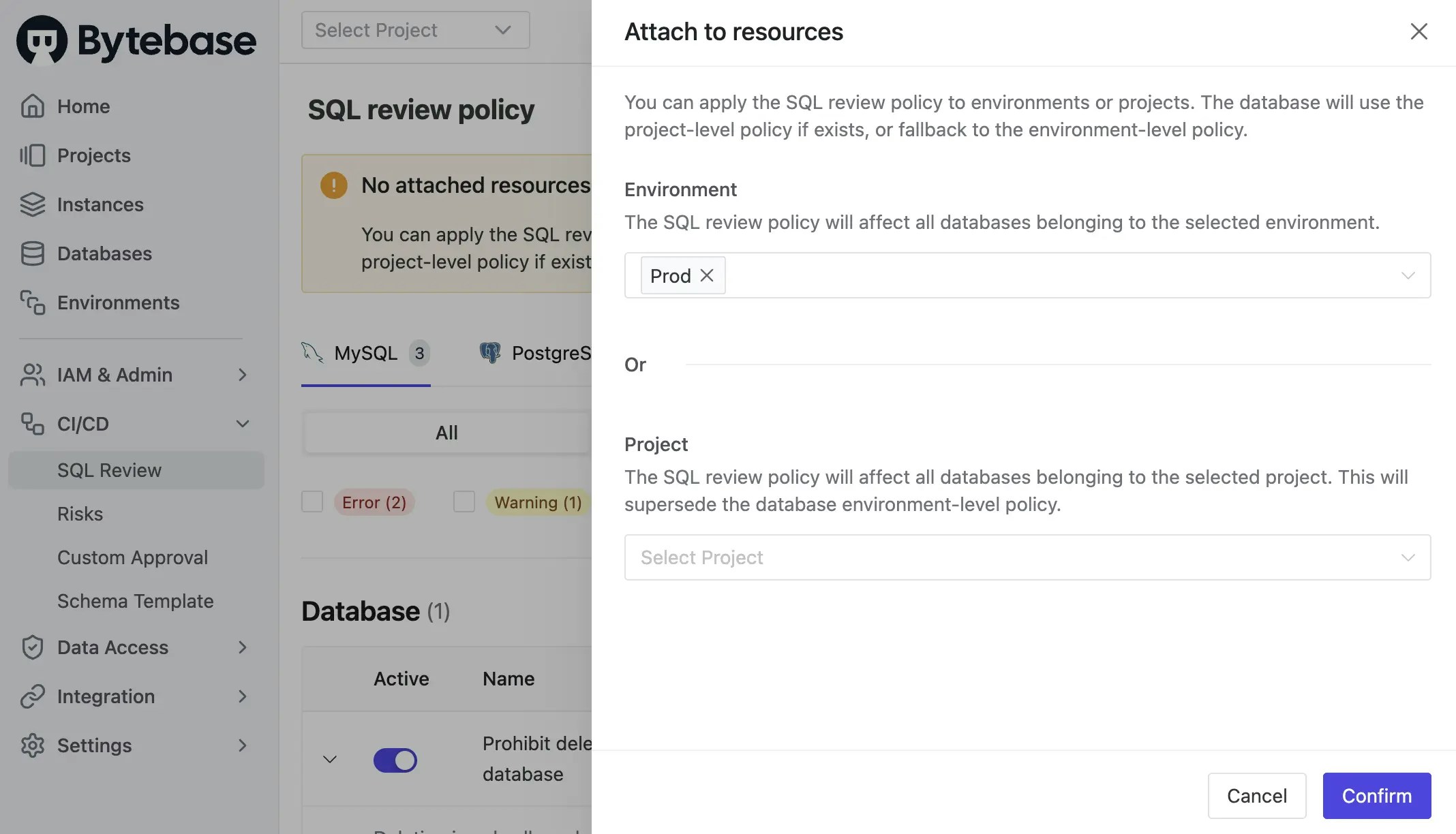 *Note: Usually we enable SQL review for `Prod` environment as above. In this demo, we would switch to enable it for `Test` to fit the following GitLab CI workflow.*
### Step 4 - Copy the Example Repository and Configure Variables
1. Create a new repository and copy the configuration files from [https://gitlab.com/bytebase-sample/gitops-example](https://gitlab.com/bytebase-sample/gitops-example). There are two ymls in this repository:
* `.gitlab-ci.yml`: The CI pipeline for the repository which includes the SQL review and release creation.
* `bytebase-review.yml`: [Lint the SQL](/sql-review/review-policy/) migration files after the MR is created.
* `bytebase-rollout.yml`: Create a release in Bytebase after the MR is merged to the `main` branch.
2. Go into `bytebase-review.yml` and `bytebase-rollout.yml`. In the `env` section, replace the variable values with your own and commit the changes.
* **BYTEBASE\_URL**: Your Bytebase instance URL (e.g., `https://bytebase.your-company.com` or your Bytebase Cloud URL)
* **BYTEBASE\_SERVICE\_ACCOUNT**: `api-example@service.bytebase.com` (the service account you created in the previous step)
* **BYTEBASE\_SERVICE\_ACCOUNT\_SECRET**: the password of the service account
The pipelines run `bytebase-action check` and `bytebase-action rollout`, which verify
version compatibility before executing. For Bytebase Cloud, use
`bytebase/bytebase-action:cloud`; for self-hosted Bytebase, use the image tag matching
your Bytebase server version, for example `bytebase/bytebase-action:3.14.0`.
*In `bytebase-rollout.yml`, pay attention to `BYTEBASE_TARGETS` in `deploy-to-test` stage. You should put all the databases including both `Test` and `Prod` environments. NOT ONLY the `Test` database.*
### Step 5 - Create the migration files
To create migration files to trigger release creation, the files have to match the following pattern:
* A migration file should start with digits, which is also its version. e.g. `202505121650_create_table_t1.sql`.
* A migration file may end with `ddl` or `dml` to indicate its change type. If it doesn't end with any of the two, its change type is DDL by default.
1. Within your forked repository, create the following migration files under `migration` directory:
* 202505121650\_create\_table\_t1.sql
```sql theme={null}
CREATE TABLE t1 (
id SERIAL PRIMARY KEY,
name TEXT
);
```
2. Commit to a new branch and create a merge request, the `sql-review` pipeline will be triggered. There will be a warning in the SQL review result.
*Note: Usually we enable SQL review for `Prod` environment as above. In this demo, we would switch to enable it for `Test` to fit the following GitLab CI workflow.*
### Step 4 - Copy the Example Repository and Configure Variables
1. Create a new repository and copy the configuration files from [https://gitlab.com/bytebase-sample/gitops-example](https://gitlab.com/bytebase-sample/gitops-example). There are two ymls in this repository:
* `.gitlab-ci.yml`: The CI pipeline for the repository which includes the SQL review and release creation.
* `bytebase-review.yml`: [Lint the SQL](/sql-review/review-policy/) migration files after the MR is created.
* `bytebase-rollout.yml`: Create a release in Bytebase after the MR is merged to the `main` branch.
2. Go into `bytebase-review.yml` and `bytebase-rollout.yml`. In the `env` section, replace the variable values with your own and commit the changes.
* **BYTEBASE\_URL**: Your Bytebase instance URL (e.g., `https://bytebase.your-company.com` or your Bytebase Cloud URL)
* **BYTEBASE\_SERVICE\_ACCOUNT**: `api-example@service.bytebase.com` (the service account you created in the previous step)
* **BYTEBASE\_SERVICE\_ACCOUNT\_SECRET**: the password of the service account
The pipelines run `bytebase-action check` and `bytebase-action rollout`, which verify
version compatibility before executing. For Bytebase Cloud, use
`bytebase/bytebase-action:cloud`; for self-hosted Bytebase, use the image tag matching
your Bytebase server version, for example `bytebase/bytebase-action:3.14.0`.
*In `bytebase-rollout.yml`, pay attention to `BYTEBASE_TARGETS` in `deploy-to-test` stage. You should put all the databases including both `Test` and `Prod` environments. NOT ONLY the `Test` database.*
### Step 5 - Create the migration files
To create migration files to trigger release creation, the files have to match the following pattern:
* A migration file should start with digits, which is also its version. e.g. `202505121650_create_table_t1.sql`.
* A migration file may end with `ddl` or `dml` to indicate its change type. If it doesn't end with any of the two, its change type is DDL by default.
1. Within your forked repository, create the following migration files under `migration` directory:
* 202505121650\_create\_table\_t1.sql
```sql theme={null}
CREATE TABLE t1 (
id SERIAL PRIMARY KEY,
name TEXT
);
```
2. Commit to a new branch and create a merge request, the `sql-review` pipeline will be triggered. There will be a warning in the SQL review result.
 3. According to the SQL review result, you can do some changes to the SQL files and push to the branch. Then you should see the SQL review has passed. There are no warnings in the SQL review result.
```sql theme={null}
CREATE TABLE t1 (
id SERIAL PRIMARY KEY,
name TEXT NOT NULL
);
```
4. When the SQL review is passed, you can merge the merge request. The `release` pipeline will be triggered to create a **release** in Bytebase and then deploy automatically.
5. Click into the pipelines, you can see the release pipeline is triggered and passed. Click the number of the pipeline, you can see the stages.
3. According to the SQL review result, you can do some changes to the SQL files and push to the branch. Then you should see the SQL review has passed. There are no warnings in the SQL review result.
```sql theme={null}
CREATE TABLE t1 (
id SERIAL PRIMARY KEY,
name TEXT NOT NULL
);
```
4. When the SQL review is passed, you can merge the merge request. The `release` pipeline will be triggered to create a **release** in Bytebase and then deploy automatically.
5. Click into the pipelines, you can see the release pipeline is triggered and passed. Click the number of the pipeline, you can see the stages.

 6. If you click the `deploy-to-test` and expand the logs, you can follow the links to Bytebase.
 ## Self-hosted GitLab Considerations
### Use `bytebase-action` in an Offline GitLab Runner
If you are self-hosting GitLab in an internal network that has no access to the public
internet, your CI/CD jobs may fail with an error like
`Job failed: failed to pull image "bytebase/bytebase-action:3.14.0"`. Since the image
cannot be pulled directly from Docker Hub, you’ll need to download it from an external
machine, then transfer and load it into your internal environment manually.
Replace `3.14.0` with your self-hosted Bytebase server version.
1. On an external (internet-accessible) machine:
```bash theme={null}
docker pull bytebase/bytebase-action:3.14.0
docker save -o bytebase-action.tar bytebase/bytebase-action:3.14.0
```
2. Transfer the `bytebase-action.tar` file to your internal server.
Use `scp`, USB drive, or any method suitable for your setup.
3. On your internal (offline) machine:
```bash theme={null}
docker load -i bytebase-action.tar
docker tag bytebase/bytebase-action:3.14.0 bytebase/bytebase-action:3.14.0
```
*Note: docker tag step is only needed if the loaded image doesn’t already have the correct tag.*
### Resolve GitLab Clone Redirect in Internal Network
If your GitLab instance uses an external URL but is hosted in an internal network, `bytebase-action` may fail with:
```
fatal: unable to update url base from redirection
```
This happens because GitLab redirects to the external URL, which isn't accessible internally.
To resolve this, set the `clone_url` in your GitLab Runner configuration to point to the internal GitLab address:
```toml theme={null}
[[runners]]
clone_url = "http://your.internal.gitlab"
```
This forces the runner to clone from the internal URL and avoids redirection errors.
## Summary
Now you have learned how to database GitOps with GitLab CI. If you want to trigger a release creation with other git providers (e.g. GitHub, Bitbucket, Azure DevOps), you may customize the workflow file.
## Self-hosted GitLab Considerations
### Use `bytebase-action` in an Offline GitLab Runner
If you are self-hosting GitLab in an internal network that has no access to the public
internet, your CI/CD jobs may fail with an error like
`Job failed: failed to pull image "bytebase/bytebase-action:3.14.0"`. Since the image
cannot be pulled directly from Docker Hub, you’ll need to download it from an external
machine, then transfer and load it into your internal environment manually.
Replace `3.14.0` with your self-hosted Bytebase server version.
1. On an external (internet-accessible) machine:
```bash theme={null}
docker pull bytebase/bytebase-action:3.14.0
docker save -o bytebase-action.tar bytebase/bytebase-action:3.14.0
```
2. Transfer the `bytebase-action.tar` file to your internal server.
Use `scp`, USB drive, or any method suitable for your setup.
3. On your internal (offline) machine:
```bash theme={null}
docker load -i bytebase-action.tar
docker tag bytebase/bytebase-action:3.14.0 bytebase/bytebase-action:3.14.0
```
*Note: docker tag step is only needed if the loaded image doesn’t already have the correct tag.*
### Resolve GitLab Clone Redirect in Internal Network
If your GitLab instance uses an external URL but is hosted in an internal network, `bytebase-action` may fail with:
```
fatal: unable to update url base from redirection
```
This happens because GitLab redirects to the external URL, which isn't accessible internally.
To resolve this, set the `clone_url` in your GitLab Runner configuration to point to the internal GitLab address:
```toml theme={null}
[[runners]]
clone_url = "http://your.internal.gitlab"
```
This forces the runner to clone from the internal URL and avoids redirection errors.
## Summary
Now you have learned how to database GitOps with GitLab CI. If you want to trigger a release creation with other git providers (e.g. GitHub, Bitbucket, Azure DevOps), you may customize the workflow file.