1. Introduction
This specification includes and expands on the basic font features described in the CSS3 Fonts specification ([CSS-FONTS-3]).
1.1. Value Definitions
This specification follows the CSS property definition conventions from [CSS2] using the value definition syntax from [CSS-VALUES-3]. Value types not defined in this specification are defined in CSS Values & Units [CSS-VALUES-3]. Combination with other CSS modules may expand the definitions of these value types.
In addition to the property-specific values listed in their definitions, all properties defined in this specification also accept the CSS-wide keywords as their property value. For readability they have not been repeated explicitly.
1.2. Interaction With Font-Relative Units
The following properties defined in this specification are font-affecting properties:
-
All longhands of the font shorthand
-
All longhands of the font-synthesis shorthand
-
All longhands of the font-variant shorthand
2. Basic Font Properties
The particular font face used to render a character is determined by the font family and other font properties that apply to a given element. This structure allows settings to be varied independently of each other.
2.1. Font family: the font-family property
| Name: | font-family |
|---|---|
| Value: | [ <font-family-name> | <generic-font-family> ]# |
| Initial: | depends on user agent |
| Applies to: | all elements and text |
| Inherited: | yes |
| Percentages: | n/a |
| Computed value: | list, each item a string and/or <generic-font-family> keywords |
| Canonical order: | per grammar |
| Animation type: | discrete |
Tests
- font-family-name-000.xht (live test) (source)
- font-family-name-001.xht (live test) (source)
- font-family-name-002.xht (live test) (source)
- font-family-name-003.xht (live test) (source)
- font-family-name-004.xht (live test) (source)
- font-family-name-005.xht (live test) (source)
- font-family-name-006.xht (live test) (source)
- font-family-name-007.xht (live test) (source)
- font-family-name-008.xht (live test) (source)
- font-family-name-009.xht (live test) (source)
- font-family-name-010.xht (live test) (source)
- font-family-name-011.xht (live test) (source)
- font-family-name-012.xht (live test) (source)
- font-family-name-013.xht (live test) (source)
- font-family-name-014.xht (live test) (source)
- font-family-name-015.xht (live test) (source)
- font-family-name-016.xht (live test) (source)
- font-family-name-017.xht (live test) (source)
- font-family-name-018.xht (live test) (source)
- font-family-name-019.xht (live test) (source)
- font-family-name-020.xht (live test) (source)
- font-family-name-021.xht (live test) (source)
- font-family-name-022.xht (live test) (source)
- font-family-name-023.xht (live test) (source)
- font-family-name-024.xht (live test) (source)
- font-family-name-025.html (live test) (source)
- generic-family-keywords-003.html (live test) (source)
- standard-font-family-10.html (live test) (source)
- standard-font-family-11.html (live test) (source)
- standard-font-family-12.html (live test) (source)
- standard-font-family-13.html (live test) (source)
- standard-font-family-14.html (live test) (source)
- standard-font-family-15.html (live test) (source)
- standard-font-family-16.html (live test) (source)
- standard-font-family-17.html (live test) (source)
- standard-font-family-18.html (live test) (source)
- standard-font-family-19.html (live test) (source)
- standard-font-family-2.html (live test) (source)
- standard-font-family-20.html (live test) (source)
- standard-font-family-3.html (live test) (source)
- standard-font-family-4.html (live test) (source)
- standard-font-family-5.html (live test) (source)
- standard-font-family-6.html (live test) (source)
- standard-font-family-7.html (live test) (source)
- standard-font-family-8.html (live test) (source)
- standard-font-family-9.html (live test) (source)
- standard-font-family.html (live test) (source)
- test_font_family_parsing.html (live test) (source)
- system-fonts.html (live test) (source)
- font-family-computed.html (live test) (source)
- font-family-invalid.html (live test) (source)
- font-family-valid.html (live test) (source)
This property specifies a prioritized list of font family names or generic family names. A font family defines a set of faces that vary in weight, width or slope. CSS uses the combination of a family name with other font properties to select an individual face. Using this selection mechanism, rather than selecting a face via the style name as is often done in design applications, allows some degree of regularity in textual display when fallback occurs.
Component values are a comma-separated list indicating alternatives. A user agent iterates through the list of family names until it matches an available font that contains a glyph for the character to be rendered. (See § 5.3 Cluster matching.) This allows for differences in available fonts across platforms and for differences in the range of characters supported by individual fonts.
body{ font-family : Helvetica, Verdana, sans-serif; }
If Helvetica is available, it will be used when rendering. If neither Helvetica nor Verdana is present, then the generic font-family sans-serif font will be used.
There are three types of font family names, two of which may be used with this property:
- <font-family-name>
-
The name of a font family, such as Helvetica or Verdana in the previous example.
This might be a locally-instaled font, or might be a web font.
- <generic-font-family>
-
Each <generic-font-family> keyword represents
a generic font choice,
and behaves as a potential alias for one or more locally-installed fonts
belonging to the specified generic font category.
A <generic-font-family> can thus be used as a fallback
for when an author’s more specific font choices are not available.
There are three types of generic family:
-
Generics which apply to all Unicode characters and will always match a locally installed font. For example, monospace.
-
Generics which apply to all Unicode characters but may not match to a locally installed font on some systems. For example, ui-rounded.
-
Generics which are writing-system specific, only apply to a subset of Unicode characters, and may not match to a locally installed font on some systems. For example, generic(fangsong).
Authors are encouraged to append a generic font family as a last alternative for improved robustness, and to use a more specific generic font family, if applicable, to prefer a specific style even if the individual named font family is not available.
Note that <generic-font-family> keywords cannot be quoted (otherwise they are interpreted as a <font-family-name>).
The set of generic family keywords is defined in § 2.1.5 Generic font families.
-
- <system-font-family-name>
-
A locally installed system font, whose use is subject to certain constraints.
In particular, it may not be used with the font-family property,
but can be used with the font shorthand.
The following values refer to system fonts:
- caption
- The font used for captioned controls (e.g., buttons, drop-downs, etc.).
- icon
- The font used to label icons.
- menu
- The font used in menus (e.g., dropdown menus and menu lists).
- message-box
- The font used in dialog boxes.
- small-caption
- The font used for labeling small controls.
- status-bar
- The font used in window status bars.
2.1.1. Syntax of <font-family-name>
<font-family-name> = <string> | <custom-ident>+
Font family names other than generic families or system font families must either be given quoted as <string>s, or unquoted as a sequence of one or more <custom-ident>.
Note: This means most punctuation characters and digits at the start of each token must be escaped in unquoted font family names.
font-family : Red/Black, sans-serif; font-family : "Lucida" Grande, sans-serif; font-family : Ahem!, sans-serif; font-family : test@foo , sans-serif; font-family : #POUND, sans-serif; font-family : Hawaii5 - 0 , sans-serif;
Any identifier which could be misinterpreted as a pre-defined keyword in the font-family value definition, or the CSS-wide keywords, is not allowed.
Note: this means that if you really have a font whose name is the same as one of the <generic-font-family> names, or the system font names, or the CSS-wide keywords, it must be quoted.
font-family : "sans-serif" , sans-serif; font-family : "default" , sans-serif; font-family : "initial" , sans-serif; font-family : "inherit" , sans-serif;
If a sequence of identifiers is given as a <font-family-name>, the computed value is the name converted to a string by joining all the identifiers in the sequence by single spaces.
To avoid mistakes in escaping, it is recommended to quote font family names that contain white space, digits, or punctuation characters other than hyphens:
body{ font-family : "New Century Schoolbook" , serif} <body style="font-family: '21st Century', fantasy" >
Font family names that happen to be the same as a font-family keyword value (e.g. CSS-wide keywords such as inherit, or <generic-font-family> keywords such as serif) must be quoted to prevent confusion with the keywords of the same names. UAs must not consider these keywords as matching the <font-family-name> type.
2.1.2. Syntax of <generic-font-family>
<generic-font-family> = <generic-font-script-specific>| <generic-font-complete> | <generic-font-incomplete> <generic-font-script-specific> =generic ( fangsong) |generic ( kai) |generic ( khmer-mul) |generic ( nastaliq) <generic-font-complete> = serif | sans-serif | system-ui | cursive | fantasy | math | monospace <generic-font-incomplete> = ui-serif | ui-sans-serif | ui-monospace | ui-rounded
To make the syntax less succeptible to clashes, more recently defined generic font families are identified using a functional syntax.
body{ font-family : "Adobe Fangsong Std R" , generic ( fangsong), serif}
The first choice in this example is a specific, named font, in Fang Song (仿宋) style. The family name is enclosed in quotes as it contains space characters. The second is a recently added script-specific generic font; it is unicode-range specific and so may not match to an actual installed font on some systems; but if it exists it will be an example of the requested style. The third is a universal generic font, which is guaranteed to match on all systems.
2.1.3. Syntax of <system-font-family-name>
<system-font-family-name> = caption | icon | menu | message-box | small-caption | status-bar
2.1.4. Relationship Between Faces and Families
A font family name only specifies a name given to a set of font faces; it does not specify an individual face.

Note: The CSS definition of font attributes used for selection are explicitly not intended to define a font taxonomy. A type designer’s idea of a family can often extend to a set of faces that vary along axes other than just the standard axes of weight (font-weight), width (font-width), and slant (font-style). A family can vary along axes that are unique to that family. The CSS font selection mechanism merely provides a way to determine the “closest” match when substitution is necessary.
Note: The precise way a set of fonts are grouped into font families varies depending upon the platform font management APIs. For example, the Windows GDI API only allows four faces to be grouped into a family, while the DirectWrite API, Core Text API, and other platforms support font families with a variety of weights, widths, and slopes (see Appendix A: Mapping platform font properties to CSS properties for more details).
See § 5.1 Localized name matching below for information on how font-family names are matched.
2.1.5. Generic font families
A generic font family is a font family which has a standard name (as defined by CSS), but which is an alias for an existing installed font family present on the system. However, a single generic font family may be a composite face combining different typefaces based on such things as the Unicode range of the character, the content language of the containing element, user preferences, system settings, etc. Different generic font families may map to the same used font.
Tests
Note: Generic font families are intended to be widely implemented on many platforms, unlike arbitrary <font-family-name>s which are usually platform-specific names. They are expected to map to different fonts on different platforms. Authors may specify these generic family names if they desire their text to follow a particular design on many platforms, and are not particular about which specific font is chosen on those platforms.
User agents should provide reasonable default choices for the generic font families, that express the characteristics of each family as well as possible, within the limits allowed by the underlying technology. User agents are encouraged to allow users to select alternative faces for the generic font families.
- serif
-
Serif fonts represent
glyphs that have finishing strokes,
flared or tapering ends,
or have actual serifed endings (including slab serifs).
Serif fonts are typically proportionately-spaced.
They often display a greater variation between thick and thin strokes
than fonts from the sans-serif generic font family.
Note: serif and sans-serif only apply to a small handful of writing scripts. Their use as generic font families in CSS is historical, and reflects the Latin-centric nature of early Web development. Better and more widely applicable names would have been, for example, "modulated" and "monoline". However, for reasons of Web compatibility, these names cannot be changed.
CSS uses the term "serif" to apply to a font for any script, although other names might be more familiar for particular scripts, such as Mincho (Japanese), Sung or Song (Chinese), Batang (Korean). For Arabic, the Naskh style would correspond to serif.
serif must always map to at least one matched font face.
Note: No guarantee is placed on the character coverage of that font face. Therefore, the font serif is mapped to may not end up being used for all content.

Sample serif fonts - sans-serif
-
Glyphs in sans-serif fonts,
as the term is used in CSS,
are generally low contrast
(vertical and horizontal stems have the close to the same thickness)
and have stroke endings that are plain
(without any flaring, cross stroke, or other ornamentation).
Sans-serif fonts are typically proportionately-spaced.
They often have little variation between thick and thin strokes,
compared to fonts from the serif family.
CSS uses the term "sans-serif" to apply to a font for any script,
although other names might be more familiar for particular scripts,
such as Gothic (Japanese),
Hei (Chinese),
or Gulim (Korean).
sans-serif must always map to at least one matched font face.
Note: No guarantee is placed on the character coverage of that font face. Therefore, the font sans-serif is mapped to may not end up being used for all content.

Sample sans-serif fonts - cursive
-
Glyphs in cursive fonts generally use a script style,
and the result looks more like handwritten pen or brush writing than printed letterwork.
CSS uses the term "cursive" to apply to a font for any script,
although other names such as Chancery, Brush, Swing and Script are also used in font names.

Sample cursive fonts - fantasy
-
Fantasy fonts are primarily decorative or expressive fonts
that contain decorative or expressive representations of characters.
These do not include Pi or Picture fonts which do not represent actual characters.

Sample fantasy fonts - monospace
-
The sole criterion of a monospace font is that all glyphs have the same fixed width.
This is often used to render samples of computer code.
monospace must always map to at least one matched font face.
Note: No guarantee is placed on the character coverage of that font face. Therefore, the font monospace is mapped to may not end up being used for all content.

Sample monospace fonts - system-ui
-
This generic font family lets text render with the default user interface font
(which, as with all § 2.1.5 Generic font families, may be a composite font)
on the platform on which the UA is running.
A cross-platform UA should use different fonts on its different supported platforms.
The purpose of system-ui is to allow web content
to integrate with the look and feel of the native OS.
This is useful for hybrid, web or cross-platform applications.
Tests
- system-ui-ar.html (live test) (source)
- system-ui-ja-vs-zh.html (live test) (source)
- system-ui-ja.html (live test) (source)
- system-ui-mixed.html (live test) (source)
- system-ui-ur-vs-ar.html (live test) (source)
- system-ui-ur.html (live test) (source)
- system-ui-zh.html (live test) (source)
- system-ui.html (live test) (source)
The precise font(s) used will depend on factors such as platform support, platform language, locale settings, user preferences, Unicode coverage and the content language. UA may optionally choose to use the text rendering engine provided by the platform when using system-ui to match the appearance of the default user interface more closely.
As with other generic font families, the substitution of specific installed fonts for system-ui does not affect the computed style.<div id=
"system-text" style="font-family: system-ui" ></div> ... window.getComputedStyle ( document.getElementById ( "system-text" )) .getPropertyValue ( "font-family" ); The script above should not have any knowledge of how system-ui is expanded to include a collection of system user interface fonts. In particular, the above script should yield a result of "system-ui" on every platform.
Note: system-ui is highly dependent on the platform environment as multiple factors may affect the default user interface font, and may have verying level of text rendering support. This may cause the displayed typeface to be undesirable for some end users (e.g. Simplified Chinese users might get a monospaced serif font on older version of Windows; lang attribute might not affect displayed font in cases like lang="uk" in Russian locale or lang="ja" in Chinese locale). Some operating system vendors does not offer means to customise system-ui, unlike UAs that generally allow users to customise the generic sans-serif or serif font family. As the name implies, system-ui is intended for use with UI elements in web application, and not for large paragraphs of text or articles.
- math
-
This font family is intended for use with mathematical expressions.
Such fonts may include additional data (for example, the OpenType MATH table) to help with the hierarchical process of equation layout. In particular, they may contain stylistic and stretching glyph variants useful in setting mathematical equations.
- generic(fangsong)
-
This font family is used for Fang Song (仿宋) typefaces in Chinese.
Fang Song is a relaxed, intermediate form
between Song (serif) and Kai (generic(kai)).
Typically, the horizontal lines are tilted,
the endpoint flourishes are smaller,
and there is less variation in stroke width,
compared to a Song style.
Fang Song is often used for official Chinese Government documents.
Note: generic(fangsong) might not map to any locally installed font, but if it does, that font will be in Fang Song style.

Chinese text displayed with sample fang song fonts - generic(kai)
-
This font family is used in
Simplified & Traditional Chinese.
A major typeface, which provides calligraphic styles for Chinese text.
It shows notable handwriting features.
Kai is commonly used in official documents and textbooks.
Most official documents in Taiwan use Kai in full text.
Kai can also be combined with other typefaces
to be used in text that needs to be differentiated
from the rest of the content,
for example, headlines, references, quotations, and dialogs.
Note: generic(kai) might not map to any locally installed font, but if it does, that font will be in Kai style.

Chinese text displayed with sample kai fonts - generic(khmer-mul)
-
This font family is used in
the Khmer language (used in Cambodia),
for titles and headings,
or to emphasise important names or nouns.
Compared to the upright (âksâr chôr) style,
which is used for regular text,
âksâr mul is characterized by
heavier, more rounded letter shapes,
and may include more ligated forms.
Despite the visually heavier style, the font weight for regular text in generic(khmer-mul) is unchanged (400).
Note: generic(khmer-mul) might not map to any locally installed font, but if it does, that font will be in âksâr mul style.

Cambodian text displayed in: (top) âksâr chôr style, set in Khmer OS Battambang; (center) âksâr mul style, set in Khmer OS Moul v6, with no ligatures; (bottom) âksâr mul style, set in Khmer OS Moul v4, with two ligatures. All fonts by Dan Hong. - generic(nastaliq)
-
This font family is the standard way of writing Urdu and Kashmiri,
and is also often a preferred style for Persian and other language text,
especially in literary genres such as poetry.
Key features include a sloping baseline for joined letters,
and overall complex shaping and positioning for base letters and diacritics alike.
There are also distinctive shapes for many glyphs and ligatures.
It is important not to fall back to a naskh style
for languages such as Urdu and Kashmiri.
Note: generic(nastaliq) might not map to any locally installed font, but if it does, that font will be in Nastaliq style.

Urdu text displayed with a sample nastaliq font (Noto Nastaliq Urdu) 
Urdu text displayed with a fallback naskh font (Scheherazade New) - ui-serif
-
This font family is used for the serif variant of the system’s
user interface. The purpose of ui-serif is to allow web
content to integrate with the look and feel of the native OS.
Note: ui-serif is not expected to map to any font on platforms without an appropriate system font.
Note: see notes on system-ui for potential issues.
- ui-sans-serif
-
This font family is used for the sans-serif variant of the system’s
user interface. The purpose of ui-sans-serif is to allow web
content to integrate with the look and feel of the native OS.
Note: ui-sans-serif is not expected to map to any font on platforms without an appropriate system font.
Note: see notes on system-ui for potential issues.
- ui-monospace
-
This font family is used for the monospaced variant of the
system’s user interface. The purpose of ui-monospace is to
allow web content to integrate with the look and feel of the
native OS.
Note: ui-monospace is not expected to map to any font on platforms without an appropriate system font.
Note: see notes on system-ui for potential issues.
- ui-rounded
-
This font family is used for the rounded variant of the system’s
user interface. The purpose of ui-rounded is to allow web
content to integrate with the look and feel of the native OS.
Note: ui-rounded is not expected to map to any font on platforms without an appropriate system font.
Note: see notes on system-ui for potential issues.


2.2. Font weight: the font-weight property
| Name: | font-weight |
|---|---|
| Value: | <font-weight-absolute> | bolder | lighter |
| Initial: | normal |
| Applies to: | all elements and text |
| Inherited: | yes |
| Percentages: | n/a |
| Computed value: | a number, see below |
| Canonical order: | per grammar |
| Animation type: | by computed value type |
Tests
- font-weight-bolder-001.xht (live test) (source)
- font-weight-lighter-001.xht (live test) (source)
- font-weight-normal-001.xht (live test) (source)
- font-weight-normal-variable.html (live test) (source)
- font-weight-sign-function.html (live test) (source)
- test-synthetic-bold.html (live test) (source)
- synthetic-bold-space-width.html (live test) (source)
- font-weight-composition.html (live test) (source)
- font-weight-computed.html (live test) (source)
- font-weight-invalid.html (live test) (source)
- font-weight-valid.html (live test) (source)
- font-parse-numeric-stretch-style-weight.html (live test) (source)
- font-weight-interpolation.html (live test) (source)
- font-weight-lighter-bolder.html (live test) (source)
- font-weight-matching-installed-fonts.html (live test) (source)
- font-weight-matching.html (live test) (source)
- font-weight-metrics.html (live test) (source)
- font-weight-parsing.html (live test) (source)
The font-weight property specifies the weight of glyphs in the font, their degree of blackness, or stroke thickness.
This property accepts values of the following:
<font-weight-absolute> =[ normal | bold | <number[ 1 , 1000 ] >]
Values have the following meanings:
- <number [1,1000]>
-
Each number indicates a weight that is at least as dark as its predecessor.
Only values greater than or equal to 1, and less than or equal to 1000, are valid,
and all other values are invalid.
Numeric values typically correspond to the commonly used weight names below.
- 100 - Thin
- 200 - Extra Light (Ultra Light)
- 300 - Light
- 400 - Normal
- 500 - Medium
- 600 - Semi Bold (Demi Bold)
- 700 - Bold
- 800 - Extra Bold (Ultra Bold)
- 900 - Black (Heavy)
Note: A font might internally provide its own weight name mappings, but those mappings within the font are disregarded in CSS.
- normal
- Same as 400.
- bold
- Same as 700.
- bolder
- Specifies a bolder weight than the inherited value. See § 2.2.1 Relative Weights.
- lighter
- Specifies a lighter weight than the inherited value. See § 2.2.1 Relative Weights.
Font formats that use a scale other than a nine-step scale should map their scale onto the CSS scale so that 400 roughly corresponds with a face that would be labeled as Regular, Book, Roman and 700 roughly matches a face that would be labeled as Bold. Alternately, weights may be inferred from style names that correspond roughly with the scale above. The scale is relative, so a face with a larger weight value must never appear lighter. If style names are used to infer weights, care should be taken to handle variations in style names across locales.
2.2.1. Relative Weights
Specified values of bolder and lighter indicate weights relative to the weight of the parent element. The computed weight is calculated based on the inherited font-weight value using the chart below.
| Inherited value (w) | bolder | lighter |
|---|---|---|
| w < 100 | 400 | No change |
| 100 ≤ w < 350 | 400 | 100 |
| 350 ≤ w < 550 | 700 | 100 |
| 550 ≤ w < 750 | 900 | 400 |
| 750 ≤ w < 900 | 900 | 700 |
| 900 ≤ w | No change | 700 |
Note: The table above is equivalent to selecting the next relative bolder or lighter face, given a font family containing normal and bold faces along with a thin and a heavy face. Authors who desire finer control over the exact weight values used for a given element can use numerical values instead of relative weights.
2.2.2. Missing weights
Quite often there are only a few weights available for a particular font family. When a weight is specified for which no face exists, a face with a nearby weight is used. In general, bold weights map to faces with heavier weights and light weights map to faces with lighter weights. (See the § 5 Font Matching Algorithm for a precise definition.)


Most user agents model a font as having a particular weight
which often corresponds to one of the numbers in the nine-step scale
described above.
While this is true of most fonts, some fonts might be configurable so as to support a range of weights.
In this situation, the user agent uses a face with a weight as close as possible to the weight requested
(see § 5 Font Matching Algorithm for the precise algorithm).
In particular, a user agent using a font which supports a range of weights
should behave the same as if a font is present at each individual weight in the range.
For TrueType / OpenType fonts that use variations,
the wght variation is used to implement varying weights.
Fractional weights are valid.
Although the practice is not well-loved by typographers, bold faces are often synthesized by user agents for families that lack actual bold faces. For the purposes of font matching, these faces must be treated as if they exist within the family. Authors can explicitly avoid this behavior by using the font-synthesis property.
2.3. Font width: the font-width property
| Name: | font-width |
|---|---|
| Value: | normal | <percentage [0,∞]> | ultra-condensed | extra-condensed | condensed | semi-condensed | semi-expanded | expanded | extra-expanded | ultra-expanded |
| Initial: | normal |
| Applies to: | all elements and text |
| Inherited: | yes |
| Percentages: | Not resolved |
| Computed value: | a percentage, see below |
| Canonical order: | per grammar |
| Animation type: | by computed value type |
Tests
- font-stretch-01.html (live test) (source)
- font-stretch-02.html (live test) (source)
- font-stretch-03.html (live test) (source)
- font-stretch-04.html (live test) (source)
- font-stretch-05.html (live test) (source)
- font-stretch-06.html (live test) (source)
- font-stretch-07.html (live test) (source)
- font-stretch-08.html (live test) (source)
- font-stretch-09.html (live test) (source)
- font-stretch-10.html (live test) (source)
- font-stretch-11.html (live test) (source)
- font-stretch-12.html (live test) (source)
- font-stretch-13.html (live test) (source)
- font-stretch-14.html (live test) (source)
- font-stretch-15.html (live test) (source)
- font-stretch-16.html (live test) (source)
- font-stretch-17.html (live test) (source)
- font-stretch-18.html (live test) (source)
- font-stretch-interpolation.html (live test) (source)
- font-width-computed.html (live test) (source)
- font-width-invalid.html (live test) (source)
- font-width-valid.html (live test) (source)
- font-parse-numeric-stretch-style-weight.html (live test) (source)
- font-stretch.html (live test) (source)
The font-width property selects a normal, condensed, or expanded face from a font family. Values are specified either as percentages or as keywords which map to a percentage as defined in the following table:
| Absolute keyword value | Numeric value |
|---|---|
| ultra-condensed | 50% |
| extra-condensed | 62.5% |
| condensed | 75% |
| semi-condensed | 87.5% |
| normal | 100% |
| semi-expanded | 112.5% |
| expanded | 125% |
| extra-expanded | 150% |
| ultra-expanded | 200% |
<percentage [0,∞]> values represent the fractional width of the glyphs, with 100% representing “normal” glyph widths (as defined by the font designer). Values less than 0% are invalid.
When a face does not exist for a given width,
values less than 100% map to a narrower face if one exists, otherwise a wider face.
Conversely, values greater than or equal to 100% map to a wider face if one exists, otherwise a narrower face.
Some fonts might support a range of width values;
if the requested width value is not available in the font,
the closest supported value is used, using the same mapping rules
(see the § 5 Font Matching Algorithm for the precise algorithm).
For TrueType / OpenType fonts that support variations,
the wdth variation is used to implement varying widths.

getComputedStyle() always serializes its value as a <percentage>, regardless of how the value was specified by the author, or whether or not a keyword happens to map to the value.
2.3.1. Font width: the font-stretch legacy name alias
For historical reasons, a font-stretch property exists which is a legacy name alias and functions in the identical way to the font-width.
h1{ font-stretch : condensed; }
The specified value of the font-width on those headings becomes set to condensed'.
h1{ font-width : condensed; }
The specified value of the font-stretch on those headings becomes set to condensed.
Tests
- font-stretch-01.html (live test) (source)
- font-stretch-02.html (live test) (source)
- font-stretch-03.html (live test) (source)
- font-stretch-04.html (live test) (source)
- font-stretch-05.html (live test) (source)
- font-stretch-06.html (live test) (source)
- font-stretch-07.html (live test) (source)
- font-stretch-08.html (live test) (source)
- font-stretch-09.html (live test) (source)
- font-stretch-10.html (live test) (source)
- font-stretch-11.html (live test) (source)
- font-stretch-12.html (live test) (source)
- font-stretch-13.html (live test) (source)
- font-stretch-14.html (live test) (source)
- font-stretch-15.html (live test) (source)
- font-stretch-16.html (live test) (source)
- font-stretch-17.html (live test) (source)
- font-stretch-18.html (live test) (source)
- font-stretch-interpolation-math-functions.html (live test) (source)
- font-stretch-interpolation.html (live test) (source)
- font-width-computed.html (live test) (source)
- font-width-invalid.html (live test) (source)
- font-width-valid.html (live test) (source)
- font-parse-numeric-stretch-style-weight.html (live test) (source)
- font-stretch.html (live test) (source)
User agents must not synthesize condensed or expanded faces for font families which lack such faces and which do not have a width variation axis. In particular, user agents must not geometrically stretch such faces.
2.4. Font style: the font-style property
| Name: | font-style |
|---|---|
| Value: | normal | italic | left | right | oblique <angle [-90deg,90deg]>? |
| Initial: | normal |
| Applies to: | all elements and text |
| Inherited: | yes |
| Percentages: | n/a |
| Computed value: | the keyword specified, plus angle in degrees if specified |
| Canonical order: | per grammar |
| Animation type: | by computed value type; normal animates as oblique 0deg |
Tests
- font-style-angle.html (live test) (source)
- test-synthetic-italic-2.html (live test) (source)
- test-synthetic-italic-3.html (live test) (source)
- test-synthetic-italic.html (live test) (source)
- font-style-interpolation.html (live test) (source)
- font-style-computed.html (live test) (source)
- font-style-invalid.html (live test) (source)
- font-style-valid.html (live test) (source)
- font-parse-numeric-stretch-style-weight.html (live test) (source)
- font-slant-1.html (live test) (source)
- font-slant-2a.html (live test) (source)
- font-slant-2b.html (live test) (source)
- font-slant-2c.html (live test) (source)
- font-slant-3.html (live test) (source)
- font-style-interpolation.html (live test) (source)
- font-style-parsing.html (live test) (source)
- slnt-backslant-variable.html (live test) (source)
- slnt-variable.html (live test) (source)
- variable-avar2-rvrn.html (live test) (source)
- variable-avar2-warp.html (live test) (source)
- variable-gpos-avar2.html (live test) (source)
The font-style property allows italic or oblique faces to be selected. Italic forms are generally cursive in nature while oblique faces are typically sloped versions of the regular face.

Values have the following meanings:
- normal
- Matches against a face that is classified as a normal face, one that is neither italic or obliqued. This represents an oblique value of "0".
- italic
- Matches against a font that is labeled as an italic face, or an oblique face if one does not exist. The angle and direction of slant is unspecified.
- left
- Matches against a font that is labeled as an italic face, with a positive (clockwise) slant; or an oblique face with positive slant, if one does not exist.
- right
- Matches against a font that is labeled as an italic face, with a negative (counter-clockwise) slant; or an oblique face with negative slant, if one does not exist.
- oblique <angle [-90deg,90deg]>?
- Controls matching against an oblique face. Positive angles represent a clockwise slant; negative angles represent a counter-clockwise slant. The lack of an <angle> represents 14deg. (Note that a font might internally provide its own mapping for "oblique", but the mapping within the font is disregarded.) Fractional and negative values are accepted; however, values less than -90deg or values greater than 90deg are invalid. If no oblique faces exist, and font-synthesis-style has the value auto, a synthetic oblique face will be generated.

A font family might contain no italic or oblique faces,
only an italic face and no oblique,
only an oblique face and no italic,
both an oblique and an italic,
multiple oblique faces at various angles,
or various combinations thereof.
The font matching routine will select a font to use
which is of the correct sign as the requested angle,
and (if there are multiple such faces) closest to the requested angle.
In general, for a requested angle greater or equal to 11deg,
larger angles are preferred;
otherwise, smaller angles are preferred.
(See § 5 Font Matching Algorithm.)
For TrueType / OpenType fonts that use variations,
the slnt variation is used to implement oblique values,
and the ital variation with a value of 1 is used to implement the italic values.
Note: the OpenType slnt axis is defined
with a positive angle meaning a counter-clockwise slant,
the opposite direction to CSS.
The CSS implementation will take this into account
when using variations
to produce oblique faces.
What direction should positive and negative obliques skew in vertical writing mode? How do we achieve skews in the opposite dimension (needed for vertical writing)?
If no italic or oblique face is available, oblique faces may be synthesized by rendering non-obliqued faces with an artificial obliquing operation. The use of these artificially obliqued faces can be disabled using the font-synthesis property.
Note: While oblique faces can be simulated by artificially sloping the glyphs of the regular face, this is not equivalent to a true oblique, in which optical stroke thicknesses are properly preserved despite the slant. It is always better to use an actual oblique font rather than rely on a synthetic version.
For the purposes of font matching, User agents may treat italic as a synonym for oblique. For user agents that treat these values distinctly, synthesis must not be performed for italic.
Note: Authors should also be aware that synthesized approaches might not be suitable for scripts like Cyrillic, where italic forms are very different in shape. It is always better to use an actual italic font rather than rely on a synthetic version.
Note: Many scripts lack the tradition of mixing a cursive form within text rendered with a normal face. Chinese, Japanese and Korean fonts almost always lack italic or oblique faces. Fonts that support a mixture of scripts will sometimes omit specific scripts, such as Arabic, from the set of glyphs supported in the italic face. User agents should be careful about making character map assumptions across faces when implementing synthesis across fonts, as italic faces in a family can have different character maps than Roman faces.
2.5. Font size: the font-size property
| Name: | font-size |
|---|---|
| Value: | <absolute-size> | <relative-size> | <length-percentage [0,∞]> | math |
| Initial: | medium |
| Applies to: | all elements and text |
| Inherited: | yes |
| Percentages: | refer to parent element’s font size |
| Computed value: | an absolute length |
| Canonical order: | per grammar |
| Animation type: | by computed value type |
Tests
- font-size-relative-across-calc-ff-bug-001.html (live test) (source)
- font-size-zero-1.html (live test) (source)
- font-size-zero-2.html (live test) (source)
- font-size-zero-3.html (live test) (source)
- font-size-zero-ligatures.html (live test) (source)
- font-size-xxx-large.html (live test) (source)
- rem-in-monospace.html (live test) (source)
- font-size-composition.html (live test) (source)
- font-size-interpolation-001.html (live test) (source)
- font-size-interpolation-002.html (live test) (source)
- font-size-interpolation-003.html (live test) (source)
- font-size-computed.html (live test) (source)
- font-size-invalid.html (live test) (source)
- font-size-valid.html (live test) (source)
This property indicates the desired height of glyphs from the font. For scalable fonts, the font-size is a scale factor applied to the EM unit of the font. For non-scalable fonts, the font-size is converted into absolute units and matched against the declared font-size of the font, using the same absolute coordinate space for both of the matched values.
Note: There is no requirement on how closely a glyph should fit its EM box. Individual fonts can have a different apparent visual size when rendered at the same font-size. Additionally, glyphs might render arbitrarily far outside their EM box; and if they overflow their containing block can induce ink overflow.
Values have the following meanings:
- <absolute-size>
-
An <absolute-size> keyword refers to an entry in a table of font sizes
computed and kept by the user agent.
See § 2.5.1 Absolute Size Keyword Mapping Table.
Possible values are:
[ xx-small | x-small | small | medium | large | x-large | xx-large | xxx-large] - <relative-size>
-
A <relative-size> keyword is interpreted
relative to the computed font-size of the parent element
and possibly the table of font sizes. Possible values are:
[ larger | smaller] If the parent element has a keyword font size in the absolute size keyword mapping table, larger may compute the font size to the next entry in the table, and smaller may compute the font size to the previous entry in the table. For example, if the parent element has a font size of font-size:medium, specifying a value of larger may make the font size of the child element font-size:large.
Instead of using next and previous items in the previous keyword table, User agents may instead use a simple ratio to increase or decrease the font size relative to the parent element. The specific ratio is unspecified, but should be around 1.2–1.5. This ratio may vary across different elements.
Note: A sight-impaired user may request a user agent use a higher ratio than default, in order to aid readability. In addition, a user agent may choose to use different ratios when it detects paragraph text as opposed to title text.
- <length-percentage [0,∞]>
-
A length value specifies an absolute font size
(independent of the user agent’s font table).
Negative lengths are invalid.
A percentage value specifies an absolute font size relative to the parent element’s computed font-size. Negative percentages are invalid.
Note: Use of percentage values or font-relative lengths such as ems and rems leads to more robust and cascadable style sheets.
- math
- Special mathematical scaling rules must be applied when determining the computed value of the font-size property.
p{ font-size : 12 pt ; } blockquote{ font-size : larger} em{ font-size : 150 % } em{ font-size : 1.5 em }
Note: The used value of this property can differ from its computed value due to font-size-adjust. However, child elements inherit the computed font-size value, which is not affected by font-size-adjust (otherwise, the effect of font-size-adjust would compound).
The actual value of this property can differ from the used value due to the unavailability of certain font sizes.
2.5.1. Absolute Size Keyword Mapping Table
The following table provides user agent guidelines for the absolute-size scaling factor and their mapping to HTML heading and absolute font-sizes. The medium value is used as the reference middle value. The user agent may fine-tune these values for different fonts or different types of display devices.
| CSS absolute-size values | xx-small | x-small | small | medium | large | x-large | xx-large | xxx-large |
|---|---|---|---|---|---|---|---|---|
| scaling factor | 3/5 | 3/4 | 8/9 | 1 | 6/5 | 3/2 | 2/1 | 3/1 |
| HTML headings | h6 | h5 | h4 | h3 | h2 | h1 | ||
HTML font sizes
| 1 | 2 | 3 | 4 | 5 | 6 | 7 |
Note: In CSS1, the suggested scaling factor between adjacent indexes was 1.5, which user experience proved to be too large. In CSS2, the suggested scaling factor for computer screen between adjacent indexes was 1.2 which still created issues for the small sizes. The new scaling factor varies between each index to provide a better readability.
To preserve readability, an UA applying these guidelines should nevertheless avoid creating font sizes of less than 9 device pixels per EM unit.
2.6. Relative sizing: the font-size-adjust property
| Name: | font-size-adjust |
|---|---|
| Value: | none | <number [0,∞]> |
| Initial: | none |
| Applies to: | all elements and text |
| Inherited: | yes |
| Percentages: | N/A |
| Computed value: | a number or the keyword none |
| Canonical order: | per grammar |
| Animation type: | by computed value type |
Tests
- font-size-adjust-001.html (live test) (source)
- font-size-adjust-002.html (live test) (source)
- font-size-adjust-003.xht (visual test) (source)
- font-size-adjust-005.xht (live test) (source)
- font-size-adjust-006.xht (live test) (source)
- font-size-adjust-007.xht (live test) (source)
- font-size-adjust-008.xht (live test) (source)
- font-size-adjust-009.html (live test) (source)
- font-size-adjust-010.html (live test) (source)
- font-size-adjust-011.html (live test) (source)
- font-size-adjust-012.html (live test) (source)
- font-size-adjust-013.html (live test) (source)
- font-size-adjust-014.html (live test) (source)
- font-size-adjust-interpolation-math-functions.html (live test) (source)
- font-size-adjust-metrics-override.html (live test) (source)
- font-size-adjust-order-001.html (live test) (source)
- font-size-adjust-reload.html (live test) (source)
- font-size-adjust-units-001.html (live test) (source)
- font-size-adjust-zero-1.html (live test) (source)
- font-size-adjust-zero-2.html (live test) (source)
- size-adjust-03.html (live test) (source)
- font-size-adjust-composition.html (live test) (source)
- font-size-adjust-interpolation.html (live test) (source)
- font-face-size-adjust.html (live test) (source)
- font-size-adjust-computed.html (live test) (source)
- font-size-adjust-invalid.html (live test) (source)
- font-size-adjust-valid.html (live test) (source)
For any given font size, the apparent size and effective legibility of text varies across fonts. For bicameral scripts such as Latin or Cyrillic that distinguish between upper and lowercase letters, the relative height of lowercase letters compared to their uppercase counterparts is a determining factor of legibility. This is commonly referred to as the aspect value and is equal to the x-height of a font divided by the font size.
Note: For text which uses diacritics, too large an x-height will actually decrease legibility as the diacritics become cramped.
In situations where font fallback occurs, fallback fonts might not share the same aspect value as the desired font family and will thus be less readable. The font-size-adjust property is a way to preserve the readability of text when font fallback occurs. It does this by adjusting the font-size so that the x-height is the same regardless of the font used.
p{ font-family : Verdana, Futura, Times; } p.adj{ font-size-adjust : 0.545 ; } <p>Lorem ipsum dolor sit amet, ...</p> <p class="adj" >Lorem ipsum dolor sit amet, ...</p>
Verdana has a relatively high aspect value of 0.545, meaning lowercase letters are relatively tall compared to uppercase letters, so at small sizes text appears legible. Times has a lower aspect value of 0.447, and so if fallback occurs, the text will be less legible at small sizes than Verdana unless font-size-adjust is also specified.
How text rendered in each of these fonts compares is shown below, the columns show text rendered in Verdana, Futura and Times. The same font-size value is used across cells within each row and red lines are included to show the differences in x-height. In the upper half, each row is rendered in the same font-size value. The same is true for the lower half, but in this half the font-size-adjust property is also set to 0.545, so that the actual font size is adjusted to preserve the x-height of Verdana across each row. Note how small text remains relatively legible across each row in the lower half.

This property allows authors to specify an aspect value for an element that will effectively preserve the x-height of the first choice font, whether it is substituted or not. Values have the following meanings:
- none
- Do not preserve the font’s x-height.
- <number [0,∞]>
-
Specifies the aspect value used in the calculation below
to calculate the adjusted font size:
c =
( a / a') swhere:
s  =  font-size value
a  =  aspect value as specified by the 'font-size-adjust' property
a' =  aspect value of actual font
c  =  adjusted font-size to use
Negative values are invalid.
This value applies to any font that is selected but in typical usage it should be based on the aspect value of the first font in the font-family list. If this is specified accurately, the
( a/a')
The value of font-size-adjust affects the used value of font-size
but does not affect the computed value.
It affects the size of relative units
that are based on font metrics
such as ex and ch
but does not affect the size of em units.
Since numeric values of line-height
refer to the computed size of font-size,
font-size-adjust does not affect the used value of line-height.
Note: In CSS, authors often specify line-height as a multiple of the font-size. Since the font-size-adjust property affects the used value of font-size, authors should take care setting the line height when font-size-adjust is used. Setting the line height too tightly can result in overlapping lines of text in this situation.
Two spans with borders are used to determine the aspect value of a font. The font-size is the same for both spans but the font-size-adjust property is specified only for the right span. Starting with a value of 0.5, the aspect value can be adjusted until the borders around the two letters line up.
p{ font-family : Futura; font-size : 500 px ; } span{ border : solid1 px red; } .adjust{ font-size-adjust : 0.5 ; } <p><span>b</span><span class="adjust" >b</span></p>

The box on the right is a bit bigger than the one on the left, so the aspect value of this font is something less than 0.5. Adjust the value until the boxes align.
2.7. Shorthand font property: the font property
| Name: | font |
|---|---|
| Value: | [ [ <'font-style'> || <font-variant-css2> || <'font-weight'> || <font-width-css3> ]? <'font-size'> [ / <'line-height'> ]? <'font-family'># ] | <system-font-family-name> |
| Initial: | see individual properties |
| Applies to: | all elements and text |
| Inherited: | yes |
| Percentages: | see individual properties |
| Computed value: | see individual properties |
| Canonical order: | per grammar |
| Animation type: | see individual properties |
Tests
- inheritance.html (live test) (source)
- font-shorthand-serialization-001.html (live test) (source)
- font-shorthand-serialization-font-stretch.html (live test) (source)
- font-shorthand-serialization-prevention.html (live test) (source)
- font-shorthand-subproperties-reset.html (live test) (source)
- quoted-generic-ignored.html (live test) (source)
- font-computed.html (live test) (source)
- font-invalid.html (live test) (source)
- font-valid.html (live test) (source)
- font-shorthand.html (live test) (source)
The syntax of this property is based on a traditional typographical shorthand notation to set multiple properties related to fonts. For historical and backwards-compatibility reasons, it is almost a shorthand property.
The font property is, except as described below, a shorthand property for setting font-style, font-variant, font-weight, font-width, font-size, line-height, font-family at the same place in the stylesheet.
Values for the font-variant property can also be included but only those supported in CSS 2.1; none of the font-variant values added in CSS Fonts Levels 3 or 4 can be used in the font shorthand:
<font-variant-css2>
    = normal | small-caps
Values for the font-width property can also be included but only those supported in CSS Fonts level 3, none of the font-width values added in this specification can be used in the font shorthand:
<font-width-css3>
    = normal | ultra-condensed | extra-condensed | condensed |
    semi-condensed | semi-expanded | expanded | extra-expanded |
    ultra-expanded
Therefore we have the following classification of font-related properties and their interaction with the font property:
- Set Explicitly
-
These longhand properties may also be set using the font shorthand property:
- Reset Implicitly
-
These properties are a reset-only sub-property of the font property and thus may not be set, but are reset to their initial values:
- Cascaded Independently
-
These (despite the property name starting with "font-") are not shorthand properties and thus are neither set nor reset by the font property:
All subproperties of the font property in the Set Explicitly and Reset Implicitly groups are first reset to their initial values.
Then, those properties the Set Explicitly group that are given explicit values in the font shorthand are set to those values. For a definition of allowed and initial values, see the individual longhand property definitions.
p{ font : 12 pt /14 pt sans-serif} p{ font : 80 % sans-serif} p{ font : x-large/110 % "new century schoolbook" , serif} p{ font : bold italic large Palatino, serif} p{ font : normal small-caps120 % /120 % fantasy} p{ font : condensed oblique12 pt "Helvetica Neue" , serif; } p{ font : condensed oblique25 deg 753 12 pt "Helvetica Neue" , serif; }
In the second rule, the font size percentage value ("80%") refers to the computed font-size of the parent element. In the third rule, the line height percentage ("110%") refers to the font size of the element itself.
The first three rules do not specify the font-variant and font-weight explicitly, so these properties receive their initial values (normal). Notice that the font family name "new century schoolbook", which contains spaces, is enclosed in quotes. The fourth rule sets the font-weight to bold, the font-style to italic, and implicitly sets font-variant to normal.
The fifth rule sets the font-variant (small-caps), the font-size (120% of the parent’s font size), the line-height (120% of the font size) and the font-family (fantasy). It follows that the keyword normal applies to the two remaining properties: font-style and font-weight.
The sixth rule sets the font-style, font-width, font-size, and font-family, the other font properties being set to their initial values.
The seventh rule sets font-style to oblique 25deg, font-weight to 753, and font-width to condensed. Note that the 25deg in this rule must be immediately following the "oblique" keyword.
Since the font-width property was not defined in CSS 2.1, when using font-width values within font rules, authors should include a extra version compatible with older user agents:
p{ font : 80 % sans-serif; /* for older user agents */ font: condensed80 % sans-serif; }
System fonts can only be set as a whole; that is, the font family, size, weight, style, etc. are all set at the same time. These values can then be altered individually if desired. If no font with the indicated characteristics exists on a given platform, the user agent should either intelligently substitute (e.g., a smaller version of the caption font might be used for the small-caption font), or substitute a user agent default font. As for regular fonts, if, for a system font, any of the individual properties are not part of the operating system’s available user preferences, those properties should be set to their initial values.
That is why this property is "almost" a shorthand property: system fonts can only be specified with this property, not with font-family itself, so font allows authors to do more than the sum of its subproperties. However, the individual properties such as font-weight are still given values taken from the system font, which can be independently varied.
Note that the keywords used for the system fonts listed above are only treated as keywords when they occur in the initial position, in other positions the same string is treated as part of the font family name:
font : menu; /* use the font settings for system menus */ font: large menu; /* use a font family named "menu" */
2.8. Controlling synthetic faces
Synthetic font faces are a fallback strategy to provide an approximation to the requested font when a font family lacks a suitable face.
-
synthesize a bold face by drawing a thin stroke around each glyph
-
synthesize small-caps, superscripts, or subscripts by rendering regular glyphs at a smaller size and positioning them appropriately
-
synthesize an oblique face by geometrical shearing of each glyph
Synthesis is a fallback strategy because the end result, while perhaps better than nothing at all, does not meet the level of quality of a face designed for the purpose.
Variable fonts, where the font designer has provided one or more axes of variation do not count as font synthesis and their use is not affected by the font-synthesis property.
2.8.1. Controlling synthesized bold: The font-synthesis-weight property
| Name: | font-synthesis-weight |
|---|---|
| Value: | auto | none |
| Initial: | auto |
| Applies to: | all elements and text |
| Inherited: | yes |
| Percentages: | N/A |
| Computed value: | specified keyword |
| Canonical order: | per grammar |
| Animation type: | discrete |
| Media: | visual |
Tests
- font-synthesis-weight-binary.html (live test) (source)
- font-synthesis-weight-first-letter.html (live test) (source)
- font-synthesis-weight-first-line.html (live test) (source)
- font-synthesis-weight.html (live test) (source)
- font-synthesis-weight-webfont-bold.html (live test) (source)
- synthetic-bold-zero-advance-glyph.html (live test) (source)
- font-synthesis-weight-invalid.html (live test) (source)
- font-synthesis-weight-valid.html (live test) (source)
This property controls whether user agents are allowed to synthesize bold font faces when a font family lacks bold faces.
- auto
- Synthesis of bold faces is allowed
- none
- Synthesis of bold faces is not allowed
2.8.2. Controlling synthesized oblique: The font-synthesis-style property
| Name: | font-synthesis-style |
|---|---|
| Value: | auto | none | oblique-only |
| Initial: | auto |
| Applies to: | all elements and text |
| Inherited: | yes |
| Percentages: | N/A |
| Computed value: | specified keyword |
| Canonical order: | per grammar |
| Animation type: | discrete |
| Media: | visual |
Tests
- font-synthesis-style-binary.html (live test) (source)
- font-synthesis-style-first-letter.html (live test) (source)
- font-synthesis-style-first-line.html (live test) (source)
- font-synthesis-style.html (live test) (source)
- font-synthesis-style-invalid.html (live test) (source)
- font-synthesis-style-valid.html (live test) (source)
This property controls whether user agents are allowed to synthesize oblique font faces when a font family lacks oblique faces.
- auto
- Synthesis of oblique faces is allowed
- none
- Synthesis of oblique faces is not allowed
- oblique-only
- Synthesis of oblique faces is allowed, but they must not be used as fallback if italic is specified
In vertical text, for positive oblique angles, the glyph is skewed such that the line-over edge shifts towards the line-right side while the line-under edge shifts towards the line-left side. For negative oblique angles, the glyph is skewed such that the line-over edge shifts towards the line-left side while the line-under edge shifts towards the line-right side. Skewing is about the center of the glyph.

2.8.3. Controlling synthesized small caps: The font-synthesis-small-caps property
| Name: | font-synthesis-small-caps |
|---|---|
| Value: | auto | none |
| Initial: | auto |
| Applies to: | all elements and text |
| Inherited: | yes |
| Percentages: | N/A |
| Computed value: | specified keyword |
| Canonical order: | per grammar |
| Animation type: | discrete |
Tests
- font-synthesis-small-caps-first-letter.html (live test) (source)
- font-synthesis-small-caps-first-line.html (live test) (source)
- font-synthesis-small-caps-not-applied.html (live test) (source)
- font-synthesis-small-caps.html (live test) (source)
- font-synthesis-small-caps-invalid.html (live test) (source)
- font-synthesis-small-caps-valid.html (live test) (source)
This property controls whether user agents are allowed to synthesize small caps font faces when a font family lacks small caps faces.
- auto
- Synthesis of small caps faces is allowed
- none
- Synthesis of small caps faces is not allowed
2.8.4. Controlling synthesized super- and subscripts: The font-synthesis-position property
| Name: | font-synthesis-position |
|---|---|
| Value: | auto | none |
| Initial: | auto |
| Applies to: | all elements and text |
| Inherited: | yes |
| Percentages: | N/A |
| Computed value: | specified keyword |
| Canonical order: | per grammar |
| Animation type: | discrete |
Tests
This property controls whether user agents are required to synthesize superscript and subscript glyphs for font-variant-position when a font lacks them.
- auto
- Synthesis of superscript and subscript forms is required
- none
- Synthesis of superscript and subscript forms is not allowed
2.8.5. Controlling synthetic faces: the font-synthesis shorthand
| Name: | font-synthesis |
|---|---|
| Value: | none | [ weight || style || small-caps || position] |
| Initial: | weight style small-caps position |
| Applies to: | all elements and text |
| Inherited: | yes |
| Percentages: | N/A |
| Computed value: | specified keyword(s) |
| Canonical order: | per grammar |
| Animation type: | discrete |
Tests
- font-synthesis-01.html (live test) (source)
- font-synthesis-02.html (live test) (source)
- font-synthesis-03.html (live test) (source)
- font-synthesis-04.html (live test) (source)
- font-synthesis-05.html (live test) (source)
- font-synthesis-06.html (live test) (source)
- font-synthesis-07.html (live test) (source)
- font-synthesis-08.html (live test) (source)
- font-synthesis-style-oblique-only.html (live test) (source)
- oblique-last-resort-weight-selection.html (live test) (source)
- oblique-request-italic-only-family-no-crash.html (live test) (source)
- synthetic-bold-space-width.html (live test) (source)
- font-synthesis-computed.html (live test) (source)
- font-synthesis-invalid.html (live test) (source)
- font-synthesis-valid.html (live test) (source)
This property is a shorthand for the font-synthesis-weight, font-synthesis-style, font-synthesis-small-caps, and font-synthesis-position properties. Values are mapped as following:
| font-synthesis value | font-synthesis-weight value | font-synthesis-style value | font-synthesis-small-caps value | font-synthesis-position value |
|---|---|---|---|---|
| none | none | none | none | none |
| weight | auto | none | none | none |
| style | none | auto | none | none |
| small-caps | none | none | auto | none |
| position | none | none | none | auto |
| weight style | auto | auto | none | none |
| weight small-caps | auto | none | auto | none |
| weight position | auto | none | none | auto |
| style small-caps | none | auto | auto | none |
| style position | none | auto | none | auto |
| small-caps position | none | none | auto | auto |
| weight style small-caps | auto | auto | auto | none |
| weight style position | auto | auto | none | auto |
| weight small-caps position | auto | none | auto | auto |
| style small-caps position | none | auto | auto | auto |
| weight style small-caps position | auto | auto | auto | auto |
*:lang( ar) { font-synthesis : none; }
3. Font Rendering Controls
3.1. Introduction to Font Rendering Controls
When using downloadable Web Fonts via @font-face, the user agent needs to know what to do while the font is actively loading. Most web browsers have adopted some form of timeout:
| Browser | Timeout | Fallback | Swap |
|---|---|---|---|
| Chrome 35+ | 3 seconds | yes | yes |
| Opera | 3 seconds | yes | yes |
| Firefox | 3 seconds | yes | yes |
| Internet Explorer | 0 seconds | yes | yes |
| Safari | 3 seconds | yes | yes |
-
Chrome and Firefox have a 3 second timeout after which the text is shown with the fallback font. Eventually, a swap occurs: the text is re-rendered with the intended font once it becomes available.
-
Internet Explorer has a 0 second timeout which results in immediate text rendering: if the requested font is not yet available, fallback is used, and text is rerendered later once the requested font becomes available.
While these default behaviors are reasonable, they’re unfortunately inconsistent across browsers. Worse, no single approach is sufficient to cover the range of use-cases required by modern user-experience– and performance–conscious applications.
The Font Loading API [CSS-FONT-LOADING-3] allows a developer to override some of the above behaviors, but that requires scripting, a non-trivial amount of effort, and ultimately doesn’t provide sufficient hooks to cover all reasonable cases. Additionally, the developer needs to either inline the loading script into their page or load an external library, introducing additional network latency before the fonts can be loaded and delaying text rendering.
Design/performance-conscious web developers have a good sense for the relative importance of a given Web Font for the intended user experience. This specification provides them the ability to control font timeout and rendering behavior. Specifically, it lets developers:
-
Define the font display policy when text is ready to be painted: block, or paint with fallback.
-
Define the font display policy once the desired font is available: rerender text with the new font, or leave it with the fallback.
-
Define custom timeout values for each font.
-
Define custom display and timeout policies per element.
3.2. The Font Display Timeline
At the moment the user agent first attempts to use a given downloaded font face on a page, the font face’s font download timer is started. This timer advances through three periods of time associated with the font face—the block period, the swap period, and the failure period—which dictate the rendering behavior of any elements using the font face:
-
The first period is the font block period. During this period, if the font face is not loaded, any element attempting to use it must instead render with an invisible fallback font face. If the font face successfully loads during the block period, the font face is then used normally.
-
The second period, occurring immediately after the block period, is the font swap period. During this period, if the font face is not loaded, any element attempting to use it must instead render with a fallback font face. If the font face successfully loads during the swap period, the font face is then used normally.
-
The third period, occurring immediately after the swap period, is the font failure period. If the font face is not yet loaded when this period starts, it’s marked as a failed load, causing normal font fallback. Otherwise, the font face is used normally.
To render with a fallback font face for a given element, the user agent must find the first font face specified in the element’s font-family list which is already loaded, and use that for rendering text. Doing this must not trigger loads of any of the fallback fonts.
To render with an invisible fallback font face for a given element, find a font face as per "render with a fallback font face". Create an anonymous font face with the same metrics as the selected font face but with all glyphs "invisible" (containing no "ink"), and use that for rendering text. Doing this must not trigger loads of any of the fallback fonts.
fallback and optional can result in some faces in a family being used while others are required to fallback, giving a "ransom note" look. Perhaps require that all fonts in a family have the same behavior (all swapped in, or all fallback)? See also the @font-feature-values for controlling the behavior on a font family basis.
4. Font Resources
4.1. The @font-face rule
The @font-face rule allows for linking to fonts that are automatically fetched and activated when needed. This allows authors to select a font that closely matches the design goals for a given page rather than limiting the font choice to a set of fonts available on a given platform. A set of font descriptors define the location of a font resource, either locally or externally, along with the style characteristics of an individual face. Multiple @font-face rules can be used to construct font families with a variety of faces. Using CSS font matching rules, a user agent can selectively download only those faces that are needed for a given piece of text.
Its syntax is:
@font-face { <declaration-list>}
Tests
The @font-face rule accepts the descriptors defined in this specification.
Each @font-facerule specifies a value for every font descriptor, either implicitly or explicitly. Those not given explicit values in the rule take the initial value listed with each descriptor in this specification. These descriptors apply solely within the context of the @font-face rule in which they are defined, and do not apply to document language elements. There is no notion of which elements the descriptors apply to or whether the values are inherited by child elements. When a given descriptor occurs multiple times in a given @font-face rule, only the last descriptor declaration is used and all prior declarations for that descriptor are ignored.
@font-face { font-family : Gentium; src : url ( http://example.com/fonts/Gentium.woff ); } p{ font-family : Gentium, serif; }
The user agent will download Gentium and use it when rendering text within paragraph elements. If for some reason the site serving the font is unavailable, the default serif font will be used.
A given set of @font-face rules define a set of fonts available for use within the documents that contain these rules. When font matching is done, fonts defined using these rules are considered before other available fonts on a system.
Downloaded fonts are only available to documents that reference them. The process of activating these fonts must not make them available to other applications or to documents that don’t directly link to the same font. User agent implementers might consider it convenient to use downloaded fonts when rendering characters in other documents for which no other available font exists as part of the installed font fallback procedure. However, this would cause a security leak since the contents of one page would be able to affect other pages, something an attacker could use as an attack vector. These restrictions do not affect caching behavior, fonts are cached the same way other web resources are cached.
Tests
This at-rule follows the forward-compatible parsing rules of CSS. Like properties in a declaration block, declarations of any descriptors that are not supported by the user agent must be ignored. @font-face rules require a font-family and src descriptor; if either of these are missing, the @font-face rule must not be considered when performing the font matching algorithm.
In cases where user agents have limited platform resources or implement the ability to disable downloadable font resources, @font-face rules must simply be ignored; the behavior of individual descriptors as defined in this specification should not be altered.
4.2. Font family: the font-family descriptor
| Name: | font-family |
|---|---|
| For: | @font-face |
| Value: | <font-family-name> |
| Initial: | N/A |
This descriptor defines the font family name that will be used in all CSS font family name matching. It overrides the font family names contained in the underlying font data. If the font family name is the same as a font family available in a given user’s environment, it effectively hides the underlying font for documents that use the stylesheet. This permits a web author to freely choose font-family names without worrying about conflicts with font family names present in a given user’s environment. Likewise, platform substitutions for a given font family name must not be used.
4.3. Font reference: the src descriptor
| Name: | src |
|---|---|
| For: | @font-face |
| Value: | <font-src-list> |
| Initial: | N/A |
This descriptor specifies the resource containing font data. Its value is a prioritized, comma-separated list of external references or locally-installed font face names. When a font is needed the user agent iterates over the set of references listed, using the first one it can successfully parse and activate. Parsing this descriptor is more complicated than parsing other descriptors; see § 4.3.1 Parsing the src descriptor for the parsing rules. Activation of a font involves downloading the file or reading it from disk, parsing it, and perhaps additional user-agent-dependent steps. Fonts containing invalid data or local font faces that are not found are ignored and the user agent loads the next font in the list.
4.3.1. Parsing the src descriptor
To parse a <font-src-list> production, parse a list of <font-src>s.
<font-src> = <url>[ format ( <font-format>) ] ?[ tech ( <font-tech>#) ] ? |local ( <font-family-name>)
<font-format>
    = [ <string> | collection | embedded-opentype | opentype
      | svg | truetype | woff | woff2 ]
<font-tech>
    = [ <font-features-tech> | <color-font-tech>
      | variations | palettes | incremental ]
<font-features-tech>
    = [ features-opentype | features-aat | features-graphite ]
<color-font-tech>
    = [ color-COLRv0 | color-COLRv1 | color-SVG | color-sbix | color-CBDT ]
Tests
While keywords are preferred to identify font formats, for reasons of backwards compatibility the following strings are also accepted, and have the same effect as if the equivalent modern syntax had been used.
| String form | Equivalent syntax |
|---|---|
| format("woff2") | format(woff2) |
| format("woff") | format(woff) |
| format("truetype") | format(truetype) |
| format("opentype") | format(opentype) |
| format("collection") | format(collection) |
| format("woff2-variations") | format(woff2) tech(variations) |
| format("woff-variations") | format(woff) tech(variations) |
| format("truetype-variations") | format(truetype) tech(variations) |
| format("opentype-variations") | format(opentype) tech(variations) |
Note: The CSS WG does not anticipate extending this list of format strings in the future.
If a component value is parsed correctly and is of a font format or font tech that the UA supports, add it to the list of supported sources. If parsing a component value results in a parsing error or its format or tech are unsupported, do not add it to the list of supported sources.
If there are no supported entries at the end of this process, the value for the src descriptor is a parse error.
These parsing rules allow for graceful fallback of fonts for user agents which don’t support a particular font tech or font format.
@font-face { font-family : "MyIncrementallyLoadedWebFont" ; src : url ( "FallbackURLForBrowsersWhichDontSupportIncrementalLoading.woff2" ) format ( "woff2" ); src : url ( "MyIncrementallyLoadedWebFont.otf" ) format ( opentype) tech ( incremental); }
4.3.2. Loading an individual item in the src descriptor
As with other URLs in CSS, the URL can be relative, in which case it is resolved relative to the location of the style sheet containing the @font-face rule. In the case of SVG fonts, the URL points to an element within a document containing SVG font definitions. If the element reference is omitted, a reference to the first defined font is implied. Similarly, font container formats that can contain more than one font must load one and only one of the fonts for a given @font-face rule. Fragment identifiers are used to indicate which font to load; these use the PostScript name of the font as defined in [RFC8081].
Conformant user agents must not use a face from the resource unless its PostScript name exactly matches the fragment identifier, and must skip downloading the resource if the given fragment identifier cannot be a valid PostScript name.
src : url ( fonts/simple.woff ); /* load simple.woff relative to stylesheet location */ src:url ( /fonts/simple.woff ); /* load simple.woff from absolute location */ src:url ( fonts/coll.otc#foo ); /* load font foo from collection coll.otc src: url(fonts/coll.woff2#foo); /* load font foo from woff2 collection coll.woff2 src: url(fonts.svg#simple); /* load SVG font with id 'simple' */
4.3.3. Selecting items in the src
External references consist of a URL, followed by an optional hint describing the format of the font resource referenced by that URL. Conformant user agents must skip downloading a font resource if the format hint indicates an unsupported or unknown font format, or if any of the font technologies are unsupported by the user agent. If no format hint is supplied, the user agent should download the font resource.
@font-face { font-family : bodytext; src : url ( ideal-sans-serif.woff2 ) format ( "woff2" ), url ( ideal-sans-serif.woff ) format ( "woff" ), url ( basic-sans-serif.ttf ) format ( "opentype" ); }
src : url ( ideal.woff2 ) format ( "woff2" ), url ( unsupported.zeb ) format ( "zebra" ), url ( basic.ttf ) format ( "opentype" );
@font-face { font-family : 源ノ角ゴシック Code JP; src : url ( SourceHanCodeJP.otc#Regular ) format ( "collection" ), url ( SourceHanCodeJP-Regular.ttf ) format ( "opentype" ); }
4.3.3.1. Local font fallback
When authors would prefer to use
a locally available copy of a given font
and download it if it’s not,
/* regular face of Gentium */ @font-face { font-family : MyGentium; src : local ( Gentium), /* prefer locally available Gentium */ url ( Gentium.woff ); /* otherwise, download it */ }
local () @font-face { font-family : foo; src : local ( inherit); }
For OpenType and TrueType fonts, this string is used to match only the Postscript name or the full font name in the name table of locally available fonts. Which type of name is used varies by platform and font, so authors should include both of these names to assure proper matching across platforms. Platform substitutions for a given font name must not be used.
/* bold face of Gentium */ @font-face { font-family : MyGentium; src : local ( Gentium Bold), /* full font name */ local ( Gentium-Bold), /* Postscript name */ url ( GentiumBold.woff ); /* otherwise, download it */ font-weight: bold; }
Just as an @font-face rule specifies
the characteristics of a single font
within a family,
the unique name used with
For OpenType fonts with multiple localizations of the full font name, the US English version must be used (language ID = 0x409 for Windows and language ID = 0 for Macintosh) or the first localization when a US English full font name is not available (the OpenType specification recommends that all fonts minimally include US English names). User agents that also match other full font names, e.g. matching the Dutch name when the current system locale is set to Dutch, are considered non-conformant.
Note: This is done, not to prefer English, but to avoid matching inconsistencies across font versions and OS localizations, since font style names (e.g. "Bold") are frequently localized into many languages and the set of localizations available varies widely across platform and font version.
User agents that match a concatenation of family name (nameID = 1) with style name (nameID = 2) are considered non-conformant.
Note: This also allows for referencing faces that belong to larger families that cannot otherwise be referenced.
@font-face { font-family : Headline; src : local ( Futura-Medium), url ( images/fonts.svg#MyGeometricModern ) format ( "svg" ); }
Create an alias for local Japanese fonts on different platforms:
@font-face { font-family : jpgothic; src : local ( HiraKakuPro-W3), local ( Meiryo), local ( IPAPGothic); }
Reference a font face that cannot be matched within a larger family:
@font-face { font-family : Hoefler Text Ornaments; /* has the same font properties as Hoefler Text Regular */ src:local ( HoeflerText-Ornaments); }
Since localized fullnames never match, a document with the header style rules below would always render using the default serif font, regardless whether a particular system locale parameter is set to Finnish or not:
@font-face { font-family : SectionHeader; src : local ( "Arial Lihavoitu" ); /* Finnish fullname for Arial Bold, should fail */ font-weight: bold; } h2{ font-family : SectionHeader, serif; }
A conformant user agent would never load the font 'gentium.eot' in the example below, since it is included in the first definition of the src descriptor which is overridden by the second definition in the same @font-face rule:
@font-face { font-family : MainText; src : url ( gentium.eot ); /* for use with older user agents */ src:local ( "Gentium" ), url ( gentium.woff ); /* Overrides src definition */ }
4.4. Font property descriptors: the font-style, font-weight, and font-width descriptors
| Name: | font-style |
|---|---|
| For: | @font-face |
| Value: | auto | normal | italic | left | right | oblique [ <angle [-90deg,90deg]>{1,2} ]? |
| Initial: | auto |
| Name: | font-weight |
|---|---|
| For: | @font-face |
| Value: | auto | <font-weight-absolute>{1,2} |
| Initial: | auto |
| Name: | font-width |
|---|---|
| For: | @font-face |
| Value: | auto | <'font-width'>{1,2} |
| Initial: | auto |
Tests
- font-face-range-order.html (live test) (source)
- font-face-stretch-auto-static.html (live test) (source)
- font-face-stretch-auto-variable.html (live test) (source)
- font-face-stretch-default-variable.html (live test) (source)
- font-face-style-normal.html (live test) (source)
- font-face-style-auto-static.html (live test) (source)
- font-face-style-auto-variable.html (live test) (source)
- font-face-style-default-variable.html (live test) (source)
- font-face-weight-auto-static.html (live test) (source)
- font-face-weight-auto-variable.html (live test) (source)
- font-face-weight-default-variable.html (live test) (source)
- font-face-sign-function.html (live test) (source)
- font-size-sign-function.html (live test) (source)
- font-style-sign-function.html (live test) (source)
- font-descriptor-range-reversed.html (live test) (source)
- font-descriptor-range-reversed-002.html (live test) (source)
These descriptors define the characteristics of a font face and are used in the process of matching styles to specific faces. For a font family defined with several @font-face rules, user agents can either download all faces in the family or use these descriptors to selectively download font faces that match actual styles used in document. The meaning of the values for these descriptors are the same as those for the corresponding font properties except that relative keywords are not allowed, bolder and lighter. If these descriptors are omitted, initial values are assumed. If specified values are out of range of the accepted values of the property of the same name, the descriptor is treated as a parse error.
Ranges are accepted in these three descriptors in place of a single value. Where a single value is specified, it has the same meaning as a range with identical startpoint and endpoint. User agents must swap the computed value of the startpoint and endpoint of the range in order to forbid decreasing ranges. Both endpoints are inclusive. The ranges are used in the Font Matching Algorithm below.
Tests
The auto values for these three descriptors have the following effects:
-
For font selection purposes, the font is selected as if the appropriate normal value (normal, normal or normal) is chosen
-
For variation axis clamping, clamping does not occur
The value for these font face style attributes
is used in place of the style implied by the underlying font data.
This allows authors to combine faces in flexible combinations,
even in situations where the original font data was arranged differently.
User agents that implement synthetic bolding and obliquing
must only apply synthetic styling in cases
where the font descriptors imply this is needed,
rather than based on the style attributes implied by the font data.
However, variation values applied to fonts defined with '@font-face'
will be clamped to both the values specified in these descriptors,
or implied by the application of variation parameters
(such as manipulation of the wght axis
to satisfy the requested font-weight),
as well as the values supported by the font file itself.
Consider a family containing a single, regular face:
@font-face { font-family : BaskervilleSimple; src : url ( baskerville-regular.woff2 ); }
Unstyled text would display using the regular face defined in the @font-face rule:

However, italic text would display in most user agents using synthetically obliqued glyphs from the regular face, since a separate italic face is not defined:

Now consider a family for which an actual italic face is defined:
@font-face { font-family : BaskervilleFull; src : url ( baskerville-regular.woff2 ); } @font-face { font-family : BaskervilleFull; src : url ( baskerville-italic.woff2 ); font-style : italic; }
The second @font-face rule
defines the font resource baskerville-italic.woff
to have style attributes of normal weight, normal stretch and italic style.
When displaying italic text,
the user agent will use this font,
since it’s the closest match for italic text.
Thus, the text will display using glyphs designed by a type designer
rather than using synthetically obliqued glyphs from the regular face:

See the section on font matching for more complete details of the process used to select a particular face within a font family.
@font-face { font-family : Lastima; src : url ( lastima-varfont.woff2 ); font-weight : 100 399 ; }
The above @font-face rule indicates that lastima-varfont.woff should be used when
font-weight is between 100 and 399. Depending on if there are any other @font-face rules which specify
lastima-varfont.woff might be used for values of font-weight
outside of the 100 - 399 range. For more details, see the § 5 Font Matching Algorithm.
As above, multiple @font-face rules may be joined together into a single family, spanning multiple ranges of font-weight, font-width, and/or font-style:
@font-face { font-family : Lastima; src : url ( lastima-varfont-lightrange.woff2 ); font-weight : 100 399 ; } @font-face { font-family : Lastima; src : url ( lastima-varfont-heavyrange.woff2 ); font-weight : 400 700 ; }
The above @font-face rules indicate that lastima-varfont-lightrange.woff should be used when
font-weight is between 100 and 399, whereas lastima-varfont-heavyrange.woff should be used when
font-weight is between 400 and 700.
4.4.1. Font width: the font-stretch legacy name alias
For historical reasons, a font-stretch descriptor exists which is a legacy name alias and functions in the identical way to the font-width descriptor.
Tests
4.5. Character range: the unicode-range descriptor
| Name: | unicode-range |
|---|---|
| For: | @font-face |
| Value: | <unicode-range-token># |
| Initial: | U+0-10FFFF |
Tests
- font-face-unicode-range-2.html (live test) (source)
- font-face-unicode-range-nbsp.html (live test) (source)
- font-face-unicode-range.html (visual test) (source)
This descriptor defines the set of Unicode codepoints that may be supported by the font face for which it is declared. The descriptor value is a comma-delimited list of Unicode range token (<unicode-range-token>) values. The union of these ranges defines the set of codepoints that serves as a hint for user agents when deciding whether or not to download a font resource for a given text run.
Each <unicode-range-token> value is a token made up of a "U+" or "u+" prefix followed by a codepoint range in one of the three forms listed below. Ranges that do not fit one of these forms are invalid and cause the declaration to be ignored.
- single codepoint (e.g. U+416)
- a Unicode codepoint, represented as one to six hexadecimal digits
- interval range (e.g. U+400-4ff)
- represented as two hyphen-separated Unicode codepoints indicating the inclusive start and end codepoints of a range
- wildcard range (e.g. U+4??)
- defined by the set of codepoints implied when trailing '?' characters signify any hexadecimal digit
Individual codepoints are written using hexadecimal values that correspond to Unicode character codepoints. Unicode codepoint values must be between 0 and 10FFFF inclusive. Digit values of codepoints are ASCII case-insensitive. For interval ranges, the start and end codepoints must be within the range noted above and the end codepoint must be greater than or equal to the start codepoint.
Wildcard ranges specified with ‘?’ that lack an
initial digit (e.g. "U+???") are valid and equivalent
to a wildcard range with an initial zero digit (e.g. "U+0???" = "U+0000-0FFF").
Wildcard ranges that extend beyond the range of
Unicode codepoints are invalid. Because of this, the maximum
number of trailing '?' wildcard characters is five, even though the
UNICODE-RANGE
token accepts six.
Within the comma-delimited list of Unicode ranges in a unicode-range descriptor declaration, ranges may overlap. The union of these ranges defines the set of codepoints for which the corresponding font may be used. User agents must not download or use the font for codepoints outside this set. User agents may normalize the list of ranges into a list that is different but represents the same set of codepoints.
The associated font might not contain glyphs for the entire set of codepoints defined by the unicode-range descriptor. When the font is used, the effective character map is the intersection of the codepoints defined by unicode-range with the font’s character map. This allows authors to define supported ranges in terms of broad ranges without worrying about the precise codepoint ranges supported by the underlying font.
4.5.1. Using character ranges to define composite fonts
Multiple @font-face rules with different unicode ranges for the same family and style descriptor values can be used to create composite fonts that mix the glyphs from different fonts for different scripts. This can be used to combine fonts that only contain glyphs for a single script (e.g. Latin, Greek, Cyrillic) or it can be used by authors as a way of segmenting a font into fonts for commonly used characters and less frequently used characters. Since the user agent will only pull down the fonts it needs this helps reduce page bandwidth.
If the unicode ranges overlap for a set of @font-face rules with the same family and style descriptor values, the rules are ordered in the reverse order they were defined; the last rule defined is the first to be checked for a given character.
Example ranges for specific languages or characters:
- unicode-range: U+A5;
- a single code point, the yen/yuan symbol
- unicode-range: U+0-7F;
- code range for basic ASCII characters
- unicode-range: U+590-5ff;
- code range for Hebrew characters
- unicode-range: U+A5, U+4E00-9FFF, U+30??, U+FF00-FF9F;
- code range for Japanese kanji, hiragana and katakana characters plus yen/yuan symbol
@font-face { font-family : BBCBengali; src : url ( fonts/BBCBengali.woff ) format ( "woff" ); unicode-range : U+00 -FF , U+980 - 9 FF ; }
@font-face { font-family : STIXGeneral; src : local ( STIXGeneral), url ( /stixfonts/STIXGeneral.otf ); unicode-range : U+000 - 49 F , U+2000 - 27 FF , U+2900 - 2 BFF , U+1 D 400 - 1 D 7 FF ; }
@font-face { font-family : JapaneseWithGentium; src : local ( MSMincho); /* no range specified, defaults to entire range */ } @font-face { font-family : JapaneseWithGentium; src : url ( ../fonts/Gentium.woff ); unicode-range : U+0 - 2 FF ; }
/* fallback font - size: 4.5MB */ @font-face { font-family : DroidSans; src : url ( DroidSansFallback.woff ); /* no range specified, defaults to entire range */ } /* Japanese glyphs - size: 1.2MB */ @font-face { font-family : DroidSans; src : url ( DroidSansJapanese.woff ); unicode-range : U+3000 - 9 FFF , U+ff??; } /* Latin, Greek, Cyrillic along with some punctuation and symbols - size: 190KB */ @font-face { font-family : DroidSans; src : url ( DroidSans.woff ); unicode-range : U+000 - 5 FF , U+1e00 - 1 fff , U+2000 - 2300 ; }
For simple Latin text, only the font for Latin characters is downloaded:
body{ font-family : DroidSans; } <p>This is that</p>
In this case the user agent first checks the unicode-range for the font containing Latin characters (DroidSans.woff). Since all the characters above are in the range U+0-5FF, the user agent downloads the font and renders the text with that font.
Next, consider text that makes use of an arrow character (⇨):
<p>This ⇨ that<p>
The user agent again first checks the unicode-range of the font containing Latin characters. Since U+2000-2300 includes the arrow code point (U+21E8), the user agent downloads the font. For this character however the Latin font does not have a matching glyph, so the effective unicode-range used for font matching excludes this code point. Next, the user agent evaluates the Japanese font. The unicode-range for the Japanese font, U+3000-9FFF and U+ff??, does not include U+21E8, so the user agent does not download the Japanese font. Next the fallback font is considered. The @font-face rule for the fallback font does not define unicode-range so its value defaults to the range of all Unicode code points. The fallback font is downloaded and used to render the arrow character.
4.6. Font features and variations: the font-feature-settings and font-variation-settings descriptors
| Name: | font-feature-settings |
|---|---|
| For: | @font-face |
| Value: | normal | <feature-tag-value># |
| Initial: | normal |
Tests
- font-feature-resolution-001.html (live test) (source)
- font-feature-resolution-002.html (live test) (source)
- font-feature-settings-descriptor-01.html (live test) (source)
- font-feature-settings-descriptor-02.html (live test) (source)
- font-feature-settings-descriptor-binary.html (live test) (source)
- font-feature-settings-serialization-001.html (live test) (source)
| Name: | font-variation-settings |
|---|---|
| For: | @font-face |
| Value: | normal | [ <string> <number>]# |
| Initial: | normal |
Tests
- calc-in-font-variation-settings.html (live test) (source)
- font-variation-settings-descriptor-01.html (live test) (source)
- font-variation-settings-descriptor-02.html (live test) (source)
- font-variation-settings-descriptor-03.html (live test) (source)
- font-variation-settings-descriptor-04.html (live test) (source)
- font-variation-settings-serialization-001.html (live test) (source)
- font-variation-settings-serialization-002.html (live test) (source)
- font-variation-settings-composition.html (live test) (source)
- font-variation-settings-interpolation.html (live test) (source)
- font-variation-settings-computed.html (live test) (source)
- font-variation-settings-invalid.html (live test) (source)
- font-variation-settings-valid.html (live test) (source)
- font-variation-settings-inherit.html (live test) (source)
These descriptors define initial settings that apply when the font defined by an @font-face rule is rendered. They do not affect font selection. Values are identical to those defined for the corresponding font-feature-settings and font-variation-settings properties defined below except that the CSS-wide keywords are omitted. When multiple font feature descriptors, properties, or variations are used, optionally along with a named instance, the cumulative effect on text rendering is detailed in the section § 7 Font Feature and Variation Resolution below.
These descriptors set features and variation values on the font object which the @font-face rule represents, rather than on an entire element. Therefore, when using these descriptors, only some glyphs in an element may be rendered with that feature, due to § 5.3 Cluster matching.
4.7. Using named instances from variable fonts: the font-named-instance descriptor
| Name: | font-named-instance |
|---|---|
| For: | @font-face |
| Value: | auto | <string> |
| Initial: | auto |
If the font-named-instance descriptor is set to a value other than auto, then the appropriate stage in the § 7 Font Feature and Variation Resolution will inspect the font file to find the first named instance in the font which has a localized name equal to the given <string> according to the rules given in § 5.1 Localized name matching. If no such named instance exists, this descriptor is treated as if it has a value of 'font-named-instance/auto'. Otherwise, this named instance’s variation axis values are applied to this position in the § 7 Font Feature and Variation Resolution.
@font-face { font-family : "AccuroVar" ; src : url ( "accurovar.otf" ) format ( "opentype" ); font-named-instance : "Grotesque" ; font-variation-settings : "XHGT" 0.7 ; }
Note: Because the variation axis values supplied in the font-weight, font-width, and font-style properties are applied before the value in the font-named-instance descriptor, there is no need to change the value of those properties when a named instance is desired.
4.8. Font request guidelines
4.8.1. Font loading guidelines
The @font-face rule is designed to allow lazy loading of font resources that are only downloaded when used within a document. A stylesheet can include @font-face rules for a library of fonts of which only a select set are used; user agents must only download those fonts that are referred to within the style rules applicable to a given page. User agents that download all fonts defined in @font-face rules without considering whether those fonts are in fact used within a page are considered non-conformant. In cases where a font might be downloaded in character fallback cases, user agents may download a font if it’s contained within the computed value of font-family for a given text run.
@font-face { font-family : GeometricModern; src : url ( font.woff ); } p{ /* font will be downloaded for pages with p elements */ font-family: GeometricModern, sans-serif; } h2{ /* font may be downloaded for pages with h2 elements, even if Futura is available locally */ font-family: Futura, GeometricModern, sans-serif; }
In cases where textual content is loaded before downloadable fonts are available, user agents must render text according to the font-display descriptor of that @font-face block. In cases where the font download fails, user agents must display the text visibly. Authors are advised to use fallback fonts in their font lists that closely match the metrics of the downloadable fonts to avoid large page reflows where possible.
4.8.2. Font fetching requirements
Note: The implications of this for authors are that fonts
will typically not be loaded cross-origin unless authors specifically
take steps to permit cross-origin loads. Sites can explicitly allow
cross-site loading of font data using the Access-Control-Allow-Origin
HTTP header. For other schemes, no explicit mechanism to allow
cross-origin loading, beyond what is permitted by the
fetch
algorithm, is defined or required.
https : //example.com/page.htmlFonts defined with the src descriptor values below will be loaded:
/* same origin (i.e. domain, scheme, port match document) */ src:url ( fonts/simple.woff ); /* data urls with no redirects are treated as same origin */ src:url ( "data:application/font-woff;base64,..." ); /* cross origin, different domain */ /* Access-Control-Allow-Origin response header set to '*' */ src:url ( http://another.example.com/fonts/simple.woff );
Fonts defined with the src descriptor values below will fail to load:
/* cross origin, different scheme */ /* no Access-Control-xxx headers in response */ src:url ( http://example.com/fonts/simple.woff ); /* cross origin, different domain */ /* no Access-Control-xxx headers in response */ src:url ( http://another.example.com/fonts/simple.woff );
4.9. Controlling Font Display Per Font-Face: the font-display descriptor
The font-display descriptor for @font-face determines how a font face is displayed, based on whether and when it is downloaded and ready to use.
| Name: | font-display |
|---|---|
| For: | @font-face |
| Value: | auto | block | swap | fallback | optional |
| Initial: | auto |
Tests
Note: For all of these values, user agents may use slightly different durations, or more sophisticated behaviors that can’t be directly expressed in the font-display syntax, in order to provide more useful behavior for their users. They may also provide the ability for users to override author-chosen behavior with something more desirable; for example, forcing all fonts to have a 0s block period.
- auto
-
The font display policy is user-agent-defined.
Note: Many browsers have a default policy similar to that specified by block.
- block
-
Gives the font face a short block period
(3s is recommended in most cases)
and an infinite swap period.
Note: In other words, the browser draws "invisible" text at first if it’s not loaded, but swaps the font face in as soon as it loads.
This value must only be used when rendering text in a particular font is required for the page to be usable. It must only be used for small pieces of text.
For example, badly designed "icon fonts" might associate a "⎙" (printer) icon with an unrelated character like "P", so if the text is displayed with a fallback font instead there will be confusing letters scattered around the page rather than the desired icon. In this case, temporary blank spots are better than using a fallback font.(However, the fallback font is used eventually, as having confusing letters scattered around the page is better than having links and such never show up at all.)
A better solution is described in the Accessibility Considerations section.
- swap
-
Gives the font face an extremely small block period
(100ms or less is recommended in most cases)
and an infinite swap period.
Note: In other words, the browser draws the text immediately with a fallback if the font face isn’t loaded, but swaps the font face in as soon as it loads.
This value should only be used when rendering text in a particular font is very important for the page, but rendering in any font will still get a correct message across. It should only be used for small pieces of text.
- fallback
-
Gives the font face an extremely small block period
(100ms or less is recommended in most cases)
and a short swap period
(3s is recommended in most cases).
Note: In other words, the font face is rendered with a fallback at first if it’s not loaded, but it’s swapped in as soon as it loads. However, if too much time passes, the fallback will be used for the rest of the page’s lifetime instead.
This value should be used for body text, or any other text where the use of the chosen font is useful and desired, but it’s acceptable for the user to see the text in a fallback font. This value is appropriate to use for large pieces of text.
For example, in large pieces of body text, it’s most important just to get the text rendered quickly, so the user can begin to read as quickly as possible. Further, once the user has started reading, they shouldn’t be disturbed by the text suddenly "shifting" as a new font is swapped in, as that’s distracting and annoying to re-find where one was in the text. - optional
-
If the font can be loaded "immediately"
(such that it’s available to be used for the "first paint" of the text),
the font is used.
Otherwise, the font is treated as if its block period and swap period both expired before it finished loading. If the font is not used due to this, the user agent may choose to abort the font download, or download it with a very low priority. If the user agent believes it would be useful for the user, it may avoid even starting the font download, and proceed immediately to using a fallback font.
An optional font must never cause the layout of the page to "jump" as it loads in. A user agent may choose to slightly delay rendering an element using an optional font to give it time to load from a possibly-slow local cache, but once the text has been painted to the screen with a fallback font instead, it must not be rendered with the optional font for the rest of the page’s lifetime.
This value should be used for body text, or any other text where the chosen font is purely a decorative "nice-to-have". It should be used anytime it is more important that the web page render quickly on first visit, than it is that the user wait a longer time to see everything perfect immediately.
For example, body text is perfectly readable in one of the browser default fonts, though a downloadable font face might be more attractive and mesh with the site’s aesthetics better. First time visitors to a site generally care far more about the site being quickly usable than they do about the finer points of its display, and optional provides a good behavior for them. If they return later, the desired font faces might have finished downloading, giving them the "intended" experience without slowing down either their first or subsequent visits.Users on very slow connections might not ever receive the "intended" experience, but optional ensures they can actually use the site, rather than quitting and going elsewhere because the site takes too long to load.
To increase the chance that an optional font will be available in time to use for rendering some text, it is recommended that the user agent employ heuristics to make it faster to access or to judge when it would be worthwhile to delay rendering some text, such as checking if the font is preloaded in HTML, or moving the file from slower to faster in-memory caches as soon as it is seen in a stylesheet (before it’s known whether it will be used on the page).These heuristics cannot be relied upon by authors, however; it must be understood that the optional value can result in the font never being used. If a somewhat higher assurance of the font being used is needed, authors should consider using the fallback value.
4.9.1. Controlling Font Display Per Font-Family via @font-feature-values
The font-display descriptor for @font-feature-values determines how a font family is displayed, by setting the "default" font-display value for @font-face rules targeting the same font family. When font-display is omitted in an @font-face rule, the user agent uses the font-display value set via @font-feature-values for the relevant font-family if one is set, and otherwise defaults to auto.
This mechanism can be used to set a default display policy for an entire font-family, and enables developers to set a display policy for @font-face rules that are not directly under their control. For example, when a font is served by a third-party font foundry, the developer does not control the @font-face rules but is still able to set a default font-display policy for the provided font-family. The ability to set a default policy for an entire font-family is also useful to avoid the ransom note effect (i.e. mismatched font faces) because the display policy is then applied to the entire font family.
| Name: | font-display |
|---|---|
| For: | @font-feature-values |
| Value: | auto | block | swap | fallback | optional |
| Initial: | auto |
4.10. Default font language overriding: the font-language-override descriptor
| Name: | font-language-override |
|---|---|
| For: | @font-face |
| Value: | normal | <string> |
| Initial: | normal |
This descriptor defines initial settings that apply when the font defined by an @font-face rule is rendered. It does not affect font selection. Values are identical to those defined for the font-language-override property defined below except that the value inherit is omitted. When multiple font feature descriptors, properties, or variations are used, the cumulative effect on text rendering is detailed in the section § 7 Font Feature and Variation Resolution below.
4.11. Default font metrics overriding: the ascent-override, descent-override and line-gap-override descriptors
| Name: | ascent-override |
|---|---|
| For: | @font-face |
| Value: | normal | <percentage [0,∞]> |
| Initial: | normal |
Tests
| Name: | descent-override |
|---|---|
| For: | @font-face |
| Value: | normal | <percentage [0,∞]> |
| Initial: | normal |
Tests
| Name: | line-gap-override |
|---|---|
| For: | @font-face |
| Value: | normal | <percentage [0,∞]> |
| Initial: | normal |
Tests
The ascent-override, descent-override and line-gap-override descriptors define the ascent metric, descent metric and line gap metric of the font, respectively.
When the descriptor value is normal, the corresponding metric value is obtained from the font file directly.
Note: User agents may draw data from different places from the font file as the metric values, which results in different text layouts.
When the descriptor value is a percentage, the corresponding metric value is resolved as the given percentage multiplied by the used font size. Negative values are invalid at parse time.
@font-face { font-family : overridden-font; ascent-override : 50 % ; ...} <span style="font-family: overridden-font; font-size: 20px;" > Outer span content <span style="font-size: 150%;" >Inner span content</span> </span>
The outer span uses an ascent value of 10px, whereas the inner span uses 15px.
@font-face { font-family : cool-web-font; src : url ( "https://example.com/font.woff" ); } @font-face { font-family : fallback-to-local; src : local ( Some Local Font); /* Override metric values to match cool-web-font */ ascent-override:125 % ; descent-override : 25 % ; line-gap-override : 0 % ; } <div style="font-family: cool-web-font, fallback-to-local" >Title goes here</div> <img src="https://example.com/largeimage" alt="A large image that you don't want to shift" >
The image will not be vertically shifted when the user agent finishes loading and switches to use the web font.
5. Font Matching Algorithm
The algorithm below describes how fonts are associated with individual runs of text. For each character in the run a font family is chosen and a particular font face is selected containing a glyph for that character.
The set of installed fonts available to the Font Matching Algorithm is explicitly undefined.
The default set of installed fonts will vary by UA, platform, and locale; it is important that users be able to customise which installed fonts are available for rendering web pages and to which generic font families, if any, these fonts are mapped.
UAs may choose to expose all installed fonts to the web, regardless of how that font was installed; doing so is likely to have good internationalization properties for users whose primary language is not supported by fonts shipping with their operating system.
UAs may alternatively choose to not initially expose any user-installed fonts to aid privacy on the web; for the set of installed fonts a user has installed is often used as a tracking vector to track users across the web. Users should then be able to add to or remove fonts from that set, according to their needs.
UAs may choose a hybrid approach, where some user-installed fonts are initially exposed for internationalization, but others aren’t. Again, users should be able to customise this starting set.
UAs are expected to make informed decisions on which fonts they expose to the web by default, so as to balance between internationalization and privacy. UAs are expected to also provide a convenient means for users to add and subtract fonts to meet their particular needs.
Tests
5.1. Localized name matching
Some font file formats allow font faces to carry multiple localizations of a particular string (e.g. family name or named instance). User agents must recognize and correctly match all of these names independent of the underlying platform localization, system API used, or document encoding.

User agents must match these names case insensitively, using the "Default Caseless Matching" algorithm outlined in the Unicode specification [UNICODE]. This algorithm is detailed in section 3.13 entitled "Default Case Algorithms". Specifically, the algorithm must be applied without normalizing the strings involved and without applying any language-specific tailorings. The case folding method specified by this algorithm uses the case mappings with status field "C" or "F" in the CaseFolding.txt file of the Unicode Character Database.
Note: For authors this means that font family names are matched case insensitively, whether those names exist in a platform font or in the @font-face rules contained in a stylesheet. Authors should take care to ensure that names use a character sequence consistent with the actual font family name, particularly when using combining characters such as diacritical marks. For example, a family name that contains a lowercase a (U+0061) followed by a combining ring (U+030A) will not match a name that looks identical but which uses the precomposed lowercase a-ring character (U+00E5) instead of the combining sequence.
Note: Implementors should take care to verify that a given caseless string comparison implementation uses this precise algorithm and not assume that a given platform string matching routine follows it, as many of these have locale-specific behavior or use some level of string normalization.
5.2. Matching font styles
The procedure for choosing a font for a given character in a run of text consists of iterating over the font families named by the font-family property, selecting a font face with the appropriate style based on other font properties and then determining whether a glyph exists for the given character. This is done using the character map of the font, data which maps characters to the default glyph for that character. A font is considered to support a given character if (1) the character is contained in the font’s character map and (2) if required by the containing script, shaping information is available for that character.
Some legacy fonts might include a given character in the character map but lack the shaping information (e.g. OpenType layout tables or Graphite tables) necessary for correctly rendering text runs containing that character.
Codepoint sequences consisting of a base character followed by a sequence of combining characters are treated slightly differently, see the section on cluster matching below.
For this procedure, the default font face for a given font family is defined to be the face that would be selected if all font style properties were set to their initial value.
-
Using the computed font property values for a given element, the user agent starts with the first family name specified by the font-family property.
-
If the family name is a generic family keyword, the user agent looks up the appropriate font family name to be used. User agents may choose the generic font family to use based on the language of the containing element or the Unicode range of the character.
-
For other family names, the user agent attempts to find the family name among fonts defined via @font-face rules and then among available installed fonts (this may include font aliases), matching names with a § 5.1 Localized name matching as outlined in the section above. If the font resources defined for a given face in an @font-face rule are either not available or contain invalid font data, then the face should be treated as not present in the family. If no faces are present for a family defined via @font-face rules, the family should be treated as missing; matching a platform font with the same name must not occur in this case.
-
If a font family match occurs, the user agent assembles the set of font faces in that family and then narrows the set to a single face using other font properties in the order given below. Fonts might be present in this group which can support a range of font-width, font-style, or font-weight properties. In this case, the algorithm proceeds as if each supported combination of values is a unique font in the set. If such a font is ultimately selected by this algorithm, particular values for font-width, font-style, and font-weight must be applied before any layout or rendering occurs. The application of these values must be applied in the Apply font matching variations step detailed in § 7 Font Feature and Variation Resolution. A group of faces defined via @font-face rules with identical font descriptor values but differing unicode-range values are considered to be a single composite font face for this step:
Tests
-
font-width is tried first. If a font does not have any concept of varying strengths of width values, its width value is mapped according table in the property definition. If the matching set includes faces with width values containing the font-width desired value, faces with width values which do not include the desired width value are removed from the matching set. If there is no face which contains the desired value, a width value is chosen using the rules below:
-
If the desired width value is less than or equal to 100%, width values below the desired width value are checked in descending order followed by width values above the desired width value in ascending order until a match is found.
-
Otherwise, width values above the desired width value are checked in ascending order followed by width values below the desired width value in descending order until a match is found.
Once the closest matching width has been determined by this process, faces with widths which do not include this determined width are removed from the matching set.
This search algorithm can be thought of as a distance function, where the lowest-distance value present in the font family is selected, and all fonts not including that value are eliminated.Consider a font family with three fonts, named A, B, and C, each with associated supported ranges for the font-width descriptor. If an element is styled with "font-width: 125%", the search algorithm can be visualized as follows:

The font width ranges supported by fonts A, B, and C are shown in the graph above. As you can see, because font B contains the minimum width value across the entire family, font B would be selected by this algorithm. However, if font B were somehow eliminated from the family, font C would then contain the lowest distance in the family, so it would be selected.
Similar to the previous example, here is the conceptual distance graph for an element styled with "font-width: 75%":
As you can see, because font B contains the minimum width value across the entire family, font B would be selected by this algorithm. However, if font B were somehow eliminated from the family, font A would then contain the lowest distance in the family, so it would be selected.
-
-
font-style is tried next (see § 5.2 Matching font styles). If a font does not have any concept of varying strengths of italics or oblique angles, its style is mapped according to the description in the font-style property definition.
If the value of font-style is italic:
-
If the matching set includes faces with italic values containing the mapped value of italic, then faces with italic values which do not include the desired italic mapped value are removed from the matching set.
-
Otherwise, italic values above the desired italic value are checked in ascending order followed by italic values below the desired italic value, until 0 is hit. Only positive values of italic values are checked in this stage.
-
If no match is found, oblique values greater than or equal to 11deg are checked in ascending order followed by oblique values below 11deg in descending order, until 0 is hit. Only positive values of oblique values are checked in this stage.
The threshold for preferring oblique over normal should be lower than the average angle.
-
If no match is found, italic values less than or equal to 0 are checked in descending order until a match is found.
-
If no match is found, oblique values less than or equal to 0deg are checked in descending order until a match is found.
Similar to the previous example, here is the conceptual distance graph for an element styled with "font-style: italic":
As you can see, because font D contains the minimum italic value across the entire family, font D would be selected by this algorithm. However, if font D were somehow eliminated from the family, font E would then contain the lowest distance in the family, so it would be selected. If E were eliminated, C would be selected. If C were eliminated, font B would not be chosen immediately; instead, oblique values would be consulted and an oblique value might be chosen. However, if no oblique value is chosen, font B would then be selected, followed by font A.
If the value of font-style is oblique and the requested angle is greater than or equal to 11deg,
-
If the matching set includes faces with oblique values containing the value of oblique, faces with oblique values which do not include the desired oblique value are removed from the matching set.
-
Otherwise, oblique values above the desired oblique value are checked in ascending order followed by oblique values below the desired oblique value, until 0 is hit. Only positive values of oblique values are checked in this stage.
-
For variable fonts with a slnt axis, a match is created by setting the slnt value with the specified oblique value. Otherwise, if font-synthesis-style has the value auto, then a fallback match is produced by geometric shearing to the specified oblique value.
-
If no match is found, italic values greater than or equal to 1 are checked in ascending order followed by italic values below 1 in descending order, until 0 is hit. Only positive values of italic values are checked in this stage.
-
If no match is found, oblique values less than or equal to 0deg are checked in descending order until a match is found.
-
If no match is found, italic values less than or equal to 0 are checked in descending order until a match is found.
Similar to the previous example, here is the conceptual distance graph for an element styled with "font-style: oblique 40deg":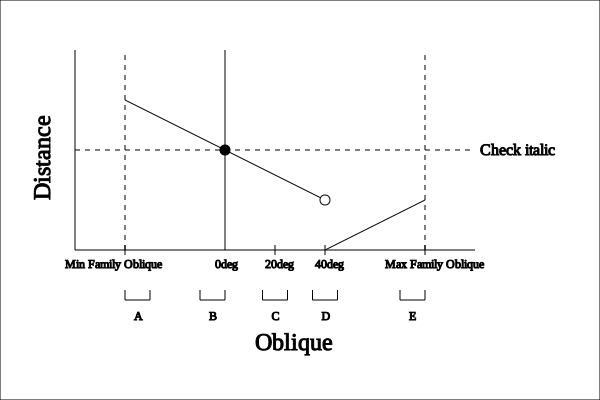
As you can see, because font D contains the minimum oblique value across the entire family, font D would be selected by this algorithm. However, if font D were somehow eliminated from the family, font E would then contain the lowest distance in the family, so it would be selected. If E were eliminated, C would be selected. If C were eliminated, font B would not be chosen immediately; instead, italic values would be consulted and an italic value might be chosen. However, if no italic value is chosen, font B would then be selected, followed by font A.
If the value of font-style is oblique and the requested angle is greater than or equal to 0deg and less than 11deg,
-
If the matching set includes faces with oblique values containing the value of oblique, faces with oblique values which do not include the desired oblique value are removed from the matching set.
-
Otherwise, oblique values below the desired oblique value are checked in descending order until 0 is hit, followed by oblique values above the desired oblique value. Only positive values of oblique values are checked in this stage.
-
For variable fonts with a slnt axis, a match is created by setting the slnt value with the specified oblique value. Otherwise, if font-synthesis-style has the value auto, then a fallback match is produced by geometric shearing to the specified oblique value.
-
If no match is found, italic values less than 1 are checked in descending order until 0 is hit, followed by italic values above 1 in ascending order. Only positive values of italic values are checked in this stage.
-
If no match is found, oblique values less than or equal to 0deg are checked in descending order until a match is found.
-
If no match is found, italic values less than or equal to 0 are checked in descending order until a match is found.
Similar to the previous example, here is the conceptual distance graph for an element styled with "font-style: oblique 13deg":
As you can see, because font D contains the minimum oblique value across the entire family, font D would be selected by this algorithm. However, if font D were somehow eliminated from the family, font C would then contain the lowest distance in the family, so it would be selected. If C were eliminated, E would be selected. If E were eliminated, font B would not be chosen immediately; instead, italic values would be consulted and an italic value might be chosen. However, if no italic value is chosen, font B would then be selected, followed by font A.
If the value of font-style is oblique and the requested angle is less than 0deg and greater than -11deg, follow the steps above, except with the negated values and opposite directions. If the value of font-style is oblique and the requested angle is less than or equal to -11deg, follow the steps above, except with the negated values and opposite directions.
If the value of font-style is normal,
-
Oblique values greater than or equal to 0 are checked in ascending order.
-
If no match is found, italic values greater than or equal to 0 are checked in ascending
-
If no match is found, oblique values less than 0deg are checked in descending order until a match is found.
-
If no match is found, italic values less than 0 are checked in descending order until a match is found.
Similar to the previous example, here is the conceptual distance graph for an element styled with "font-style: normal":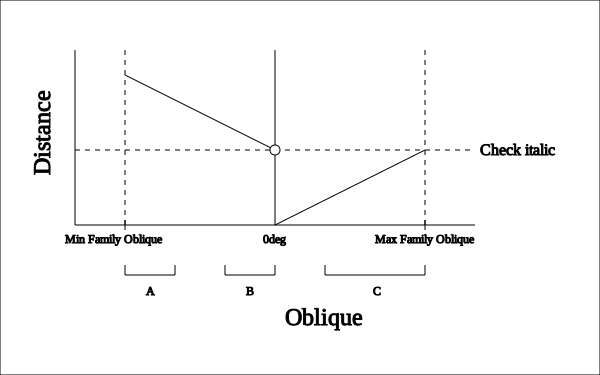
As you can see, because font C contains the minimum oblique value across the entire family, font C would be selected by this algorithm. However, if font C were somehow eliminated from the family, font B would not be chosen immediately; instead, italic values would be consulted and an italic value might be chosen. However, if no italic value is chosen, font B would then be selected, followed by font A.
If an oblique angle was found in the above search, all faces which don’t include that oblique angle are excluded from the matching set. Otherwise, if an italic value was found in the above search, all faces which don’t include that italic value are excluded from the matching set.
Tests
User agents are not required to distinguish between italic and oblique fonts. In such user agents, the font-style matching steps above are performed by mapping both italic values and oblique angles onto a common scale. The exact nature of this mapping is undefined, however, an italic value of 1 must map to the same value that an oblique angle of 11deg maps to. Within font families defined via @font-face rules, italic and oblique faces must be distinguished using the value of the font-style descriptor.
For families that lack any italic or oblique faces, user agents may create artificial oblique faces, if this is permitted by the value of the font-synthesis property.
-
-
font-weight is matched next. If a font does not have any concept of varying strengths of weights, its weight is mapped according list in the property definition. If bolder/lighter relative weights are used, the effective weight is calculated based on the inherited weight value, as described in the definition of the font-weight property. If the matching set after performing the steps above includes faces with weight values containing the font-weight desired value, faces with weight values which do not include the desired font-weight value are removed from the matching set. If there is no face which contains the desired value, a weight value is chosen using the rules below:
-
If the desired weight is inclusively between 400 and 500, weights greater than or equal to the target weight are checked in ascending order until 500 is hit and checked, followed by weights less than the target weight in descending order, followed by weights greater than 500, until a match is found.
-
If the desired weight is less than 400, weights less than or equal to the desired weight are checked in descending order followed by weights above the desired weight in ascending order until a match is found.
-
If the desired weight is greater than 500, weights greater than or equal to the desired weight are checked in ascending order followed by weights below the desired weight in descending order until a match is found.
Similar to the previous example, here is the conceptual distance graph for an element styled with "font-weight: 400":
As you can see, because font B contains the minimum distance across the entire family, font B would be selected by this algorithm. However, if font B were somehow eliminated from the family, font C would then contain the lowest distance in the family, so it would be selected. If C were eliminated, D would be selected, followed by fonts A and then E.
Similar to the previous example, here is the conceptual distance graph for an element styled with "font-weight: 450":
As you can see, because font C contains the minimum distance across the entire family, font C would be selected by this algorithm. However, if font C were somehow eliminated from the family, font D would then contain the lowest distance in the family, so it would be selected. If D were also eliminated, B would be selected, followed by fonts A and then E.
Similar to the previous example, here is the conceptual distance graph for an element styled with "font-weight: 500":
As you can see, because font D contains the minimum distance across the entire family, font D would be selected by this algorithm. However, if font D were somehow eliminated from the family, font B would then contain the lowest distance in the family, so it would be selected. If B were eliminated, C would be selected, followed by fonts B, A, and then E.
Similar to the previous example, here is the conceptual distance graph for an element styled with "font-weight: 300":
As you can see, because font B contains the minimum distance across the entire family, font B would be selected by this algorithm. However, if font B were somehow eliminated from the family, font A would then contain the lowest distance in the family, so it would be selected. If A were eliminated, C would be selected.
Once the closest matching weight has been determined by this process, faces with weights which do not include this determined weight are removed from the matching set.
Note: There is a small behavior change between [CSS-FONTS-3] and this specification with the animation of the font-weight property. Previously, interpolated values of font-weight were rounded to their closest multiple of 100, and the font-matching algorithm was run on these rounded values. In this specification, the font-matching algorithm is able to accept any value, so no rounding occurs. The small behavior change is due to the discontinuous nature of the font-matching algorithm.
-
-
font-size must be matched within a UA-dependent margin of tolerance. (Typically, sizes for scalable fonts are rounded to the nearest whole pixel, while the tolerance for bitmapped fonts could be as large as 20%.) Further computations, e.g., by em values in other properties, are based on the font-size value that is used, not the one that is specified.
Note that more than one font might be remaining in the matching set after performing the above steps. If so, the user agent must choose a single font from the matching set and continue these steps with it. The choice of which font to choose can differ between multiple user agents and multiple operating system platforms; however, it must not differ between two elements in the same document.
-
-
If the matched face is defined via @font-face rules, user agents must use the procedure below to select a single font:
-
If the font resource has not been loaded and the range of characters defined by the unicode-range descriptor value includes the character in question, load the font.
-
After downloading, if the effective character map supports the character in question, select that font.
When the matched face is a composite face, user agents must use the procedure above on each of the faces in the composite face in reverse order of @font-face rule definition.
While the download occurs, user agents must either wait until the font is downloaded or render once with substituted font metrics and render again once the font is downloaded.
-
-
If no matching face exists or the matched face does not contain a glyph for the character to be rendered, the next family name is selected and the previous three steps repeated. Glyphs from other faces in the family are not considered. The only exception is that user agents may optionally substitute a synthetically obliqued version of the default face if that face supports a given glyph and synthesis of these faces is permitted by the value of the font-synthesis property. For example, a synthetic italic version of the regular face might be used if the italic face doesn’t support glyphs for Arabic.
-
If there are no more font families to be evaluated and no matching face has been found, then the user agent performs an installed font fallback procedure to find the best match for the character to be rendered. The result of this procedure can vary across user agents.
-
If a particular character cannot be displayed using any font, the user agent should indicate by some means that a character is not being displayed, displaying either a symbolic representation of the missing glyph (e.g. using a Last Resort Font) or using the missing character glyph from a default font.
Optimizations of this process are allowed provided that an implementation behaves as if the algorithm had been followed exactly. Matching occurs in a well-defined order to ensure that the results are as consistent as possible across user agents, given an identical set of available fonts and rendering tech.
The first available font, used for example in the definition of font-relative lengths such as ex or in the definition of the line-height property, is defined to be the first font for which the character U+0020 (space) is not excluded by a unicode-range, given the font families in the font-family list (or a user agent’s default font if none are available).
Installed fonts referenced directly by family name, rather than via @font-face rules, are considered to have a unicode-range that covers the entire Unicode code space.
Tests
- first-available-font-001.html (live test) (source)
- first-available-font-002.html (live test) (source)
- first-available-font-003.html (live test) (source)
- first-available-font-004.html (live test) (source)
- first-available-font-005.html (live test) (source)
- first-available-font-006.html (live test) (source)
- first-available-font-007.html (live test) (source)
- italic-oblique-fallback.html (live test) (source)
Note: it does not matter whether that font actually has a glyph for the space character.
5.3. Cluster matching
When text contains characters such as combining marks, ide