Tagging Tools: Useful set of tools for POST (Part-of-speech tagging)
Tagging Tools allows you to perform common tasks such as visual confusion matrix generation and complex file split. See http://ferrod20.github.io/taggingTools for more information.
Define 2 files to compare (gold standard and tagged file) and build the confusion matrix. The output can be set as LaTex or plain text.
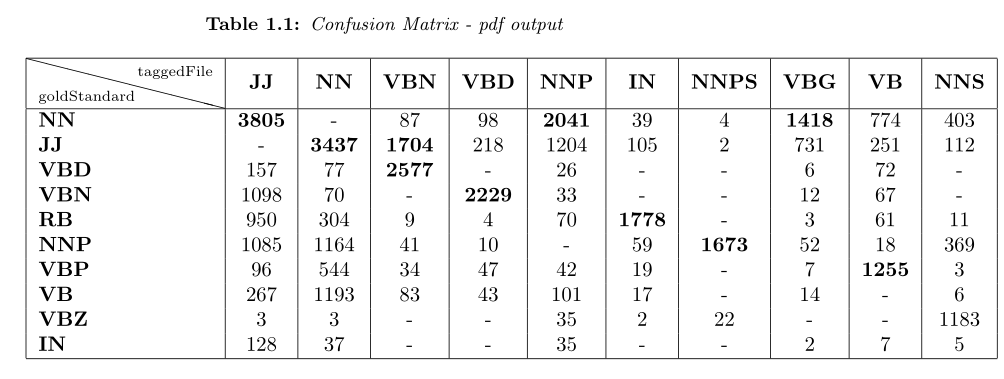
You can see below an example of a pdf confusion matrix output. By default the cells with the biggest differences are shown.
###Pdf output example:
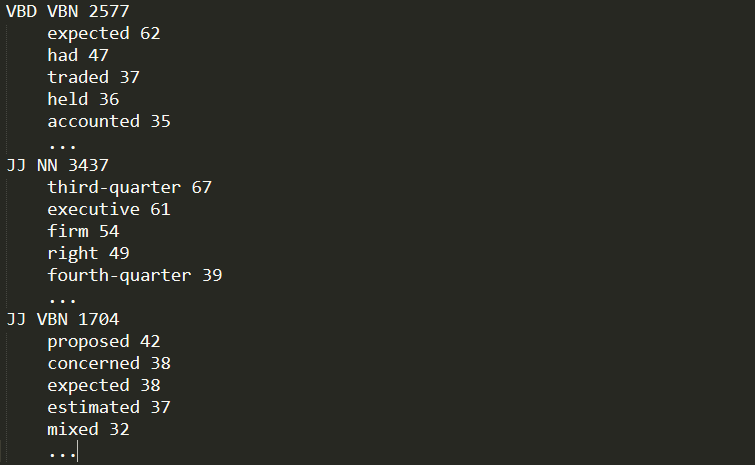
In the next example you can see a plain text confusion matrix output. Notice that for each cell the file shows the words whose tags differ.
###Plain text output example:
###Tags translation: You can also use a tags translation file in order to convert tags from one tagset into another before the comparison occurs. Penn Treebank-C5 translation is included as an example.
Command:
tt -compare <goldStandard> <fileToCompare> <output> [options]
Compares goldStandard file against fileToCompare generating a confusion matrix as output.
Where [options] is one or more of the following:
-
-l: Set latex output, default is text plain output. -
-t=<matrixTitle>: Matrix title to be written on output file. -
-rt=<rowTitle>: Row title to be written on output file. -
-ct=<columnTitle>: Column title to be written on output file. -
-SC=<specificCellsFile>: Use a custom file to set specific cells to be shown. -
-T=<translationFile>: Specify a custom tags translation file to be used on comparison. The translation is applied tofileToComparetags in order to convert them to goldStandard tags. -
-s=<size>: If latex output is set, size sets matrix size. If plain text output is set, size sets quantity of different words for each cell.
##Files splitter: This tool splits a file in several parts, preserving sentences. It optionally generates the complementary file for each extracted part.
Command:
tt -split <file> <parts> [options]
Where [options] is one or more of the following:
-
-c[=complementPrefix]: Generates a complement file for each part. If specified, complement file names will be generated using * *complementPrefixas the base name. Default complementPrefix is 'Comp' -
-r: Random selection of senteneces.
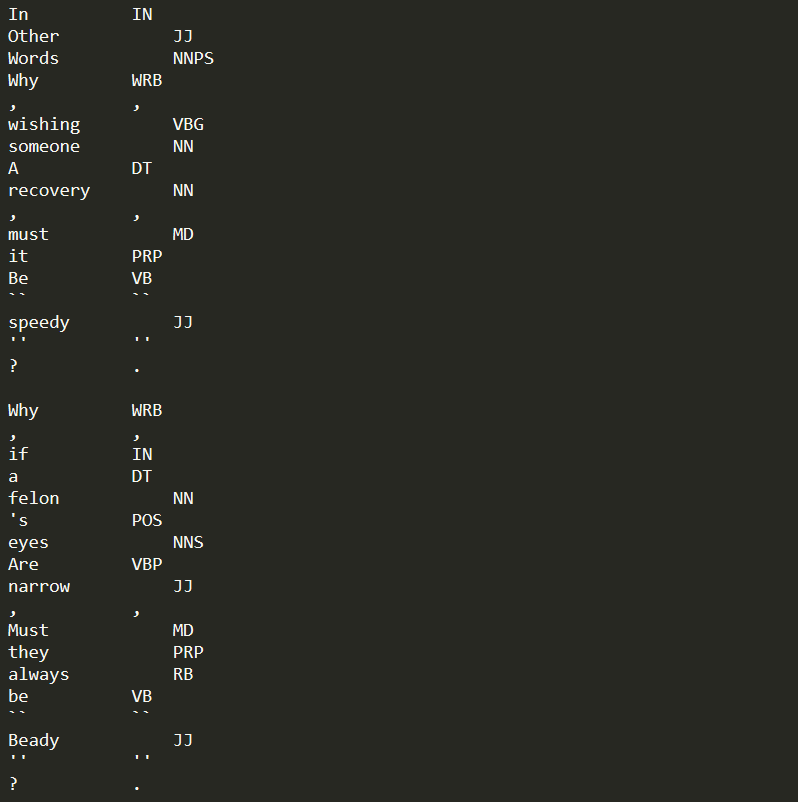
##File format: Sentences are composed of tokens (words and symbols).
Each line should contain a token. Empty lines will be used to denote sentence break.
For comparison operations, each line must contain the token followed by a tab and the POS tag.
Example:
##Binaries: Linux and Windows binaries are available here
Tagging Tools is released under the MIT License.