

A full-featured App development assistant. You deserve it.
Compatible exclusively with iOS platforms, with privacy-related features omitted.
In the development stage of the App, in order to improve the efficiency of the developer and tester, we have developed a collection of tools with full-featured functions. I can use it to simulate the positioning of the App; preview the content of the sandbox file; view the information and logs of the App; test the performance of the App and view the detailed information of the view, etc. Each tool solves every problem in our app development. And our UI interface is simple and beautiful, and the user experience is good.
At present, we provide a total of more than 30+ built-in tools, including 2 platform tools; 10 common tools; 12 performance tools; and 5 ui tools. At the same time, you can also add your own tools in our DoKit panel for unified management.
DoKit is rich in functions, easy to access, and easy to expand. Everyone is welcome to try and feedback.
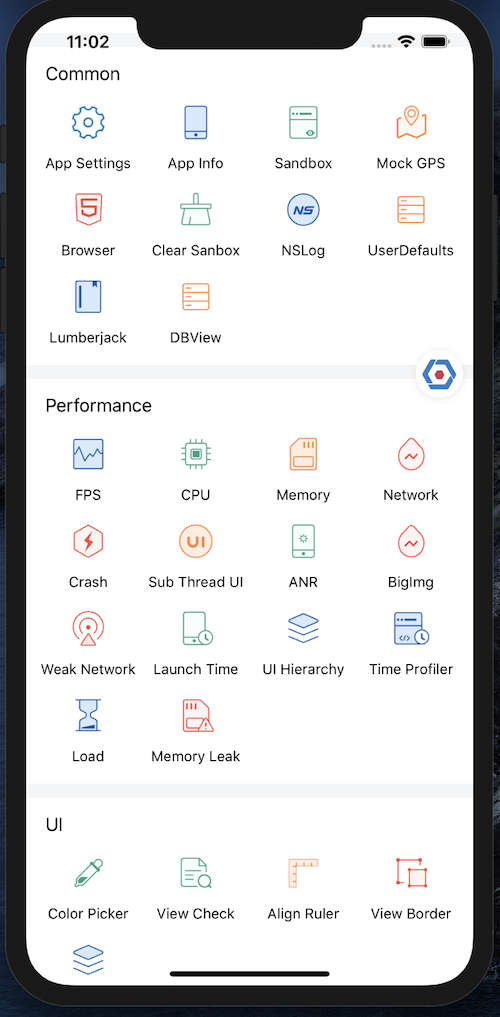
- App Settings: quickly open the setting page of the specific app
- App Info:view mobile phone information, device information, permission information of the current App
- Sanbox:support sandbox files for viewing, previewing, deleting, sharing and other operations
- Mock GPS:You can uniformly modify the latitude and longitude callbacks inside the App
- Browser:quickly enter the html address to view the effect of the page, and support scan code;
- Clear Sanbox: delete all data in the sandbox
- UserDefaults: add, delete, and modify the NSUserDefaults file
- JavaScript:execute scripts in the web view
- FPS:view the real-time fps of the app through floating window
- CPU:view the real-time cpu of the app through floating window
- Memory:view the real-time memory of the app through floating window
- ANR:when the app appears anr, print out the corresponding code call stack
- UI Hierrachy:find the deepest element in each page
- Time Profiler:analyze app performance bottlenecks at the function level
- Load:check out all "+load" functions in iOS, and time-consuming statistics
- Color Picker:capture the color value of every point in the app in real time
- View Check:you can touch any view and view their detailed information, including view name, view position, background color, font color, font size
- Align Ruler:ability to capture screen coordinates in real time and see if views are aligned
- View Border:draw the border of each view
    source 'https://github.com/iangeli/Specs.git'
    pod 'dokit/Core', '~> 3.0.2', :configurations => ['Debug'] #Required
    pod 'dokit/WithGPS', '~> 3.0.2', :configurations => ['Debug'] #Optional
    pod 'dokit/WithLoad', '~> 3.0.2', :configurations => ['Debug'] #Optional
#ifdef DEBUG
#import <dokit/DoraemonManager.h>
#endif

- (BOOL)application:(UIApplication *)application didFinishLaunchingWithOptions:(NSDictionary *)launchOptions {
    #ifdef DEBUG
    [[DoraemonManager shareInstance] install];
    #endif
}
If you want to know more details about DoKit, please visit https://www.dokit.cn/.

DoraemonKit is available under the Apache-2.0 license. See the LICENSE file for more info.