Share. Learn. Build Together.
Togu is a student-friendly learning platform where users can ask questions, share answers, and earn badges for being active and helpful. Think of it as a focused, community-driven Q&A platform designed for students to connect and learn together.


- 🔐 OneLogin Authentication - Secure sign-in with OneLogin OIDC
- 📝 Ask Questions - Post questions with text, tags, code snippets, and images
- 💬 Answer Questions - Help others by providing detailed answers
- ⬆️ Voting System - Upvote helpful questions and answers
- 🏆 Badges & Points - Earn achievements and XP for your contributions
- 👤 User Profiles - View your stats, badges, questions, and answers
- 📊 Leaderboard - See top contributors ranked by points
- 🔍 Search & Filter - Find questions by text or tags
- 📱 Modern UI - Beautiful, intuitive SwiftUI interface
- ✨ Pull-to-Refresh - Refresh content with a simple swipe
- 📄 Pagination - Efficient loading of large question lists
- 🎨 Code Snippet Support - Syntax-highlighted code blocks
- 🏷️ Tag System - Organize content with predefined tags
- 📈 Activity Feed - Track your recent contributions
- 🎯 Empty States - Helpful messages when no content is available
- ⚡ Error Handling - Graceful error messages and retry logic
- 🔄 Real-time Updates - Instant UI updates after actions
Togu follows the MVVM (Model-View-ViewModel) architecture pattern for clean separation of concerns:
┌─────────────┐
│    Views    │  SwiftUI Views (UI Layer)
├─────────────┤
│  ViewModels │  Business Logic & State Management
├─────────────┤
│   Services  │  API & Data Layer (Airtable)
├─────────────┤
│    Models   │  Data Structures
└─────────────┘
- Views: SwiftUI views for UI presentation
- ViewModels:
ObservableObjectclasses managing view state and business logic - Services: Domain-specific services for API interactions
QuestionsService- Question operationsAnswersService- Answer operationsUsersService- User managementVotesService- Voting systemBadgesService- Badge managementLeaderboardService- Leaderboard data
- Models: Data structures representing entities (Question, Answer, User, etc.)
- Language: Swift 5.9+
- Framework: SwiftUI
- iOS Version: 17.0+
- Authentication: OneLogin OIDC
- Backend: Airtable API
- Architecture: MVVM
- Async/Await: Modern Swift concurrency
Before you begin, ensure you have:
- Xcode 15.0+ installed
- iOS 17.0+ deployment target
- Airtable Account with:
- API Key
- Base ID
- Tables:
Users,Questions,Answers,Votes,Badges
- OneLogin Configuration:
- Client ID
- Redirect URI:
com.shfa.Togu.oidc:// - OIDC configuration file (
OL-Oidc.plist)
git clone https://github.com/yourusername/togu.git
cd togu-
Create an Airtable base with the following tables:
- Users (Name, Email, ProfilePicture, Points, Badges)
- Questions (Title, Body, Tags, Author, Upvotes, Image)
- Answers (AnswerText, Author, Question, Upvotes, CreatedDate)
- Votes (User, TargetType, TargetQuestion, TargetAnswer)
- Badges (Badge Name, Description, Icon, EarnedBy, DateEarned)
-
Get your Airtable API Key and Base ID from Airtable Account
- Set up your OneLogin OIDC application
- Add the redirect URI:
com.shfa.Togu.oidc:// - Place your
OL-Oidc.plistconfiguration file inTogu/Resources/
Add the following to your Xcode project's build settings or Info.plist:
<key>AIRTABLE_KEY</key>
<string>your_airtable_api_key</string>
<key>AIRTABLE_BASE_ID</key>
<string>your_airtable_base_id</string>
Alternatively, set them as environment variables in your Xcode scheme.
- Open
Togu.xcodeprojin Xcode - Select your target device or simulator
- Press
Cmd + Rto build and run
Watch the demo of Togu in action here:
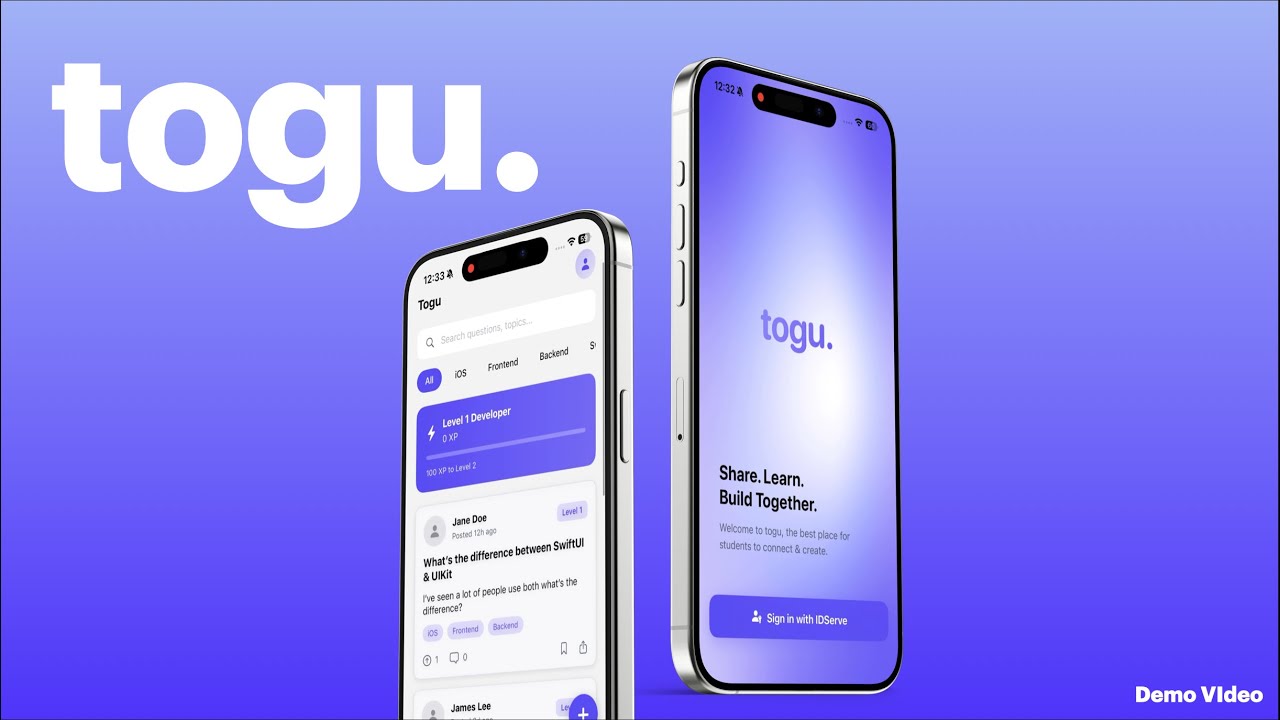
💡 Click the image above to watch the demo on YouTube.
For quick testing and access, you can use the following test user account to sign in and create a password:
Email: reignite@hackathon.com
Password: Hackathon1@
This account is intended for demo and hackathon testing purposes.
Once logged in, you can, post questions & answers, reciver badges, and explore all platform features.
Togu/
├── App/
│   ├── ToguApp.swift          # App entry point
│   ├── RootRouter.swift       # Navigation router
│   └── AppDelegate.swift      # App lifecycle
│
├── Model/
│   ├── Question.swift         # Question data model
│   ├── Answer.swift           # Answer data model
│   ├── AuthState.swift        # Authentication state
│   ├── LeaderboardEntry.swift # Leaderboard entry
│   ├── Activity.swift         # User activity
│   ├── Skill.swift            # User skills
│   ├── LevelInfo.swift        # Level calculation
│   └── AirtableModels.swift   # Airtable field mappings
│
├── ViewModel/
│   ├── AuthViewModel.swift           # Authentication logic
│   ├── FeedViewModel.swift           # Question feed logic
│   ├── HomeViewModel.swift           # Home screen logic
│   ├── QuestionDetailViewModel.swift # Question detail logic
│   ├── AnswerFormViewModel.swift     # Answer form logic
│   ├── AskQuestionViewModel.swift    # Ask question logic
│   ├── ProfileViewModel.swift        # Profile logic
│   ├── LeaderboardViewModel.swift    # Leaderboard logic
│   └── LoginViewModel.swift          # Login screen logic
│
├── Views/
│   ├── MainTabView.swift          # Tab navigation
│   ├── HomeView.swift             # Question feed
│   ├── QuestionDetailView.swift   # Question details
│   ├── AskQuestionView.swift      # Post question
│   ├── AnswerFormView.swift       # Post answer
│   ├── ProfileView.swift          # User profile
│   ├── LeaderboardView.swift      # Leaderboard
│   ├── LoginView.swift            # Login screen
│   ├── SplashView.swift           # Splash screen
│   └── Components/                # Reusable UI components
│       ├── Profile/
│       ├── Leaderboard/
│       ├── QuestionDetail/
│       ├── EmptyStateView.swift
│       ├── LoadingView.swift
│       ├── ErrorView.swift
│       └── ErrorToast.swift
│
├── Services/
│   ├── AirtableService.swift      # Main Airtable facade
│   ├── QuestionsService.swift     # Question operations
│   ├── AnswersService.swift       # Answer operations
│   ├── UsersService.swift         # User operations
│   ├── VotesService.swift         # Voting operations
│   ├── BadgesService.swift        # Badge operations
│   ├── LeaderboardService.swift  # Leaderboard operations
│   ├── AirtableConfig.swift       # Airtable configuration
│   └── AirtableListResponse.swift # API response models
│
├── Utilities/
│   ├── FormattingHelpers.swift    # Date/number formatting
│   └── MarkdownHelpers.swift      # Markdown processing
│
└── Resources/
    ├── Assets.xcassets           # App assets
    ├── Theme.swift                # App theme & colors
    ├── Info.plist                 # App configuration
    └── OL-Oidc.plist              # OneLogin config
Togu uses a custom design system defined in Theme.swift:
- Primary Color:
toguPrimary- Main brand color - Background:
toguBackground- App background - Text Colors:
toguTextPrimary,toguTextSecondary - Card Colors:
toguCard,toguBorder - Error Colors:
toguError,toguDisabled
All colors are accessible via SwiftUI's Color extension.
- User taps "Sign in with IDServe" on
LoginView AuthViewModelinitiates OneLogin OIDC flow- User authenticates via OneLogin
- App receives OIDC callback with tokens
- User is redirected to
MainTabView(Home) - User data is synced with Airtable
Userstable
HomeView → FeedViewModel → QuestionsService → Airtable API
AskQuestionView → AskQuestionViewModel → QuestionsService → Airtable API
                → BadgesService (check milestones)
                → UsersService (award points)
QuestionDetailView → QuestionDetailViewModel → VotesService → Airtable API
                  → UsersService (award points to author)
To test the app:
- Login: Use your OneLogin credentials
- Ask Questions: Post questions with tags and optional images
- Answer Questions: Provide helpful answers
- Vote: Upvote quality content
- Check Profile: View your badges, points, and activity
- Leaderboard: See top contributors
- Mesh gradient background requires iOS 18.0+ (fallback provided for earlier versions)
- Image uploads are limited by Airtable's attachment size limits
- Badge awarding may have a slight delay due to Airtable indexing
- Push notifications for new answers
- Markdown editor for questions/answers
- Image compression before upload
- Offline mode with local caching
- Dark mode support
- Question categories
- Answer acceptance feature
- User mentions and notifications
Contributions are welcome! Please follow these steps:
- Fork the repository
- Create a feature branch (
git checkout -b feature/amazing-feature) - Commit your changes (
git commit -m 'Add some amazing feature') - Push to the branch (
git push origin feature/amazing-feature) - Open a Pull Request
- Follow Swift naming conventions
- Use SwiftUI best practices
- Maintain MVVM architecture
- Add comments for complex logic
- Keep functions focused and small
This project is licensed under the MIT License - see the LICENSE file for details.
- Airtable for the backend infrastructure
- OneLogin for authentication
- SwiftUI community for inspiration and best practices
If you encounter any issues or have questions:
- Check the Issues page
- Create a new issue with detailed information
- Contact the maintainers
Made with ❤️ for learner, by learners